Windows XP Windows 7 Windows 2003 Windows Vista Windows 綜合教學 Linux 系統教學
Windows 10 Windows 8 Windows 2008 Windows NT Windows Server 電腦軟體教學
您现在的位置: Windows教程網 >> Windows教程 >  >> Linux 系統教學 >> 關於 Linux

解決 Ubuntu Tomcat 部署網站中文亂碼的三步驟設定

編輯:關於 Linux

亂碼成因

瀏覽器送出的字元編碼與伺服器端預期編碼不一致,導致中文參數入庫後顯示亂碼。

解決三步驟

  1. 統一系統編碼為 UTF-8:確認 /etc/default/locale 設定 LANG="en_US.UTF-8" 等。
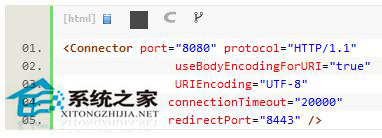
  2. 調整 Tomcat server.xml:在 <Connector> 加入 URIEncoding="UTF-8"。
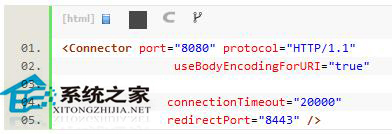
    修改後:
  3. 設定 MySQL my.cnf:在 [mysqld] 區段加入 character-set-server=utf8,建立資料庫前完成設定,否則舊庫字元集不一致仍會報錯。

結語

系統、Tomcat、MySQL 三端統一 UTF-8,即可徹底消除中文亂碼困擾。

Copyright © Windows教程網 All Rights Reserved