Ubuntu 下無線網卡無法掃描訊號,先確認硬體開關開啟、指示燈亮起,再啟用網路介面:
sudo ifconfig wlan0 up
接著安裝圖形化掃描工具:
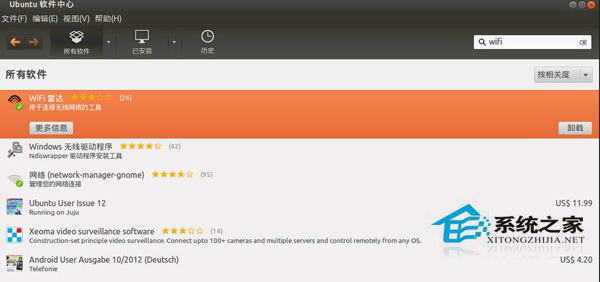
# 軟體中心搜尋 "wifi" 安裝 "WiFi Radar"
# 或終端安裝
sudo apt-get install wifi-radar
執行 wifi-radar 或從選單啟動,介面直觀,即可掃描並連線可用熱點。
wifi-radar
若仍無法掃描,請檢查驅動是否正確載入(lspci -k 或 lsmod 確認無線網卡模組)。
lspci -k
lsmod
Linux 命令列執行 PHP 檔案並傳遞參數完整教學:$argv/$argc 實戰範例
Linux 設定 PostgreSQL 允許遠端連線:pg_hba.conf 與 postgresql.conf 雙檔修改
Linux 以其他使用者身分執行程式:runuser、su、sudo、systemd-run 四大工具對比與最佳實務
Linux 系統安全加固實戰指南:從最小化安裝到權限管控
Linux 信號機制深度入門:從核心原理到實戰應用
Linux 登入介面個性化:/etc/bashrc、/etc/motd、~/.bashrc 打造專屬歡迎畫面
VMware 虛擬機修改 Linux MAC 地址三大法:.vmx 配置最推薦
Linux reconfig 指令使用教學:轉換 XFree86 舊版配置檔