單用戶模式(Runlevel 1)允許無密碼取得 root shell,攻擊者可重設 root 密碼。透過為 GRUB 開機選單設定密碼,可強制進入單用戶模式前需輸入 GRUB 密碼,有效阻擋實體存取攻擊。
grub-md5-crypt
# 輸入兩次密碼,輸出範例:
# $1$abc123$def456ghi789jkl0
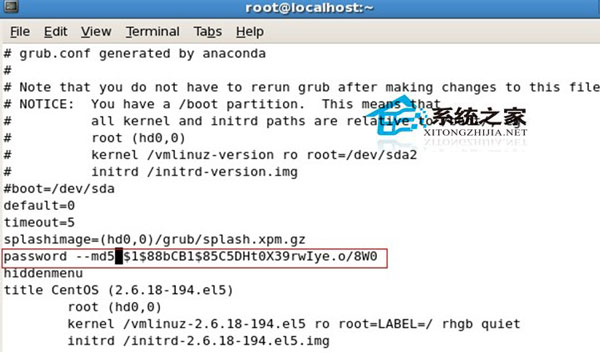
# 複製此字串vi /boot/grub/grub.conf
# 在 splashimage 行下方新增:
password --md5 $1$abc123$def456ghi789jkl0
# 完整範例:
default=0
timeout=5
splashimage=(hd0,0)/grub/splash.xpm.gz
password --md5 $1$abc123$def456ghi789jkl0
title CentOS 5.5
root (hd0,0)
kernel /vmlinuz-2.6.18-194.el5 ro root=/dev/VolGroup00/LogVol00
initrd /initrd-2.6.18-194.el5.imgreboot
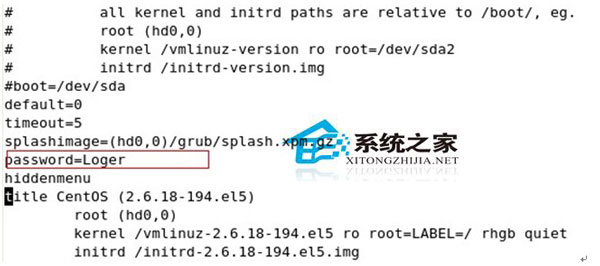
# 開機 GRUB 選單出現,按 p 輸入密碼後才能編輯(e)或進入命令列(c)password myplainpassword
# 設定檔可見密碼,安全性極低,僅供測試環境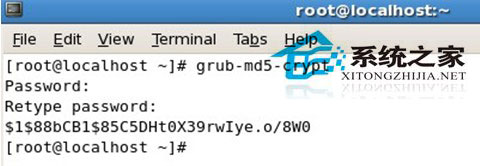
/etc/grub.d/40_custom + grub2-mkconfig,設定方式不同。Linux 系統監控新選擇:dstat 安裝與欄位解讀完整指南
Linux 開機報錯 "unable to load selinux policy" 兩大原因與解決方案
Linux 進程排程算法深度解析:FCFS、RR、多級回饋佇列、實時排程與 CFS 完全公平排程器
Linux dd 指令測試磁碟效能:四種同步模式差異與實測數據對比
Linux 終端機 11 個必學高效操作技巧:快捷鍵、sudo!!、背景執行、nohup、at 排程
Linux SVN post-commit hook failed (exit code 255) 錯誤排除與修正