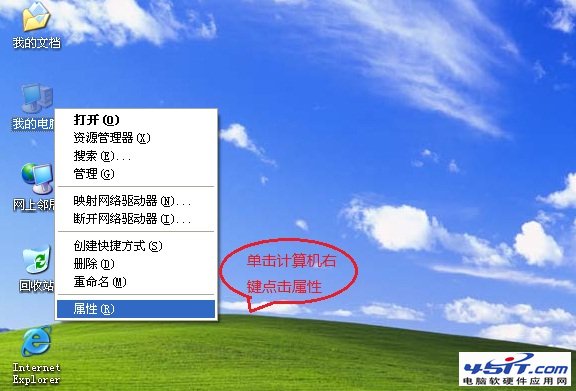
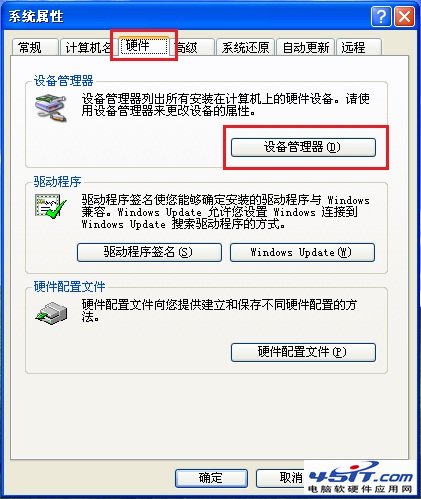
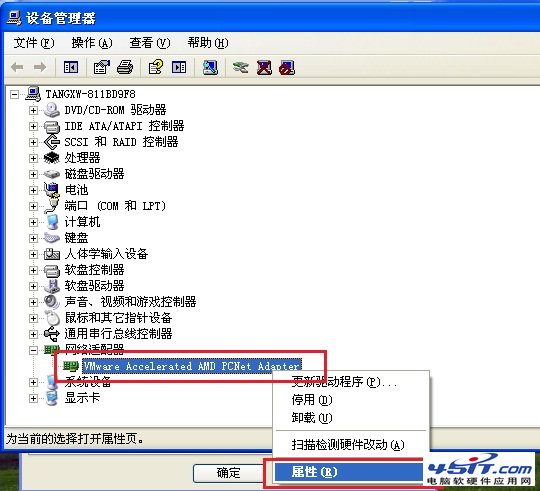
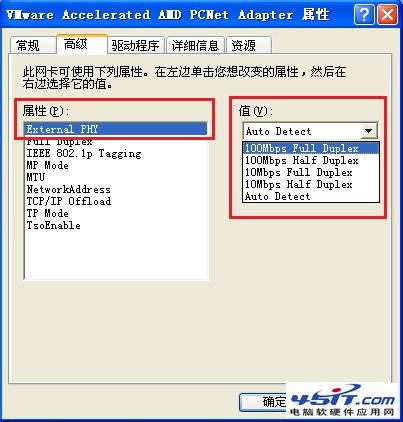
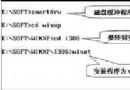
設定完成後重新啟動網路連線生效。適用於解決網路協商失敗、速率不穩等問題。
Windows XP 下使用虛擬光碟機的相容性陷阱與對策
Windows XP 磁碟儲存一句話秘技:右鍵重組、改磁碟代號、CHKDSK 替代、關閉空間警告、虛擬光碟優先、零秒掃描等待
Windows 與它的父親·四:DOS 目錄管理內部命令(MD、RD、CD)與外部命令(TREE、DELTREE、MOVE、SUBST)
Windows XP 開機選單八大模式完整解析與自動關機修復
XP-AntiSpy:Windows XP SP2 系統優化神器,一鍵關閉多餘服務提升效能
Windows XP 安裝光碟瘦身製作教學:從 560MB 壓縮至 448MB
Windows XP 隱藏功能大公開:20 個實用秘技一次掌握
Windows XP 工作列假死怎麼辦?兩招徹底解決任務列無回應