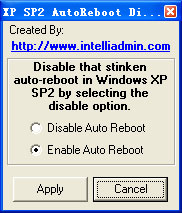
Windows Update 更新完畢自動重開機極惱人。Vista 有「重新開機管理器」,XP 用戶可用免費小工具 Autoreboot Disable 解決。
之後 Windows Update 完成將不再自動重開機,由使用者自行決定何時重開機。
Vista/Win7 用戶無需工具,命令列執行 sc stop wuauserv 即可暫停更新服務。
sc stop wuauserv
最新 XP 系統下載 | 最新 Win7 系統下載
Windows XP 如何解除安裝顯示卡驅動程式?裝置管理員標準移除流程
WinXP 寬帶連線錯誤 769「無法連線到指定目標」?網卡被停用、驅動異常、硬體故障三大成因與啟用網卡圖解
WinXP/Win7桌面捷徑變未知圖示:軟體修復與還原預設圖示雙法
圖片藏木馬?GDI+ 漏洞原理、中毒徵兆、補丁修補與防護全指南
Windows 實用小技巧 60 則:鍵盤高手的進階必修課
用記事本備份修改XP註冊檔:兩大核心分支完整匯出教學
修改 WinXP 資源回收筒名稱與圖示,打造個性化桌面
Windows XP 快速鍵大全:Alt 鍵組合鍵 13 組實用技巧提升操作效率