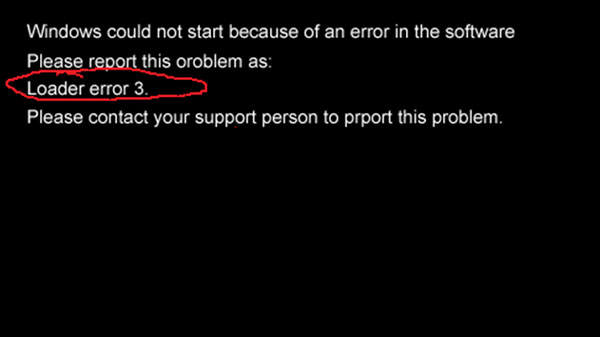
開機出現 「Windows could not start because of an error in the software... Loader error 3」,代表啟動載入器 NTLDR 遺失或損毀。解決方法是從同版本 XP 系統複製 NTLDR 至故障電腦系統盤。
NTLDR
C:\NTLDR
C:\
此錯誤常因安裝軟體導致引導檔受損,替換 NTLDR 即可根治,無需重灌系統。
解決 Windows XP 工作列無法操作(點擊無反應)問題
WinXP 桌機找回消失的攝影機圖示:四大故障原因與對策
WinXP啟用語音辨識系統的完整設定流程
WinXP 資料夾路徑列不顯示完整路徑怎麼辦?資料夾選項 → 檢視 → 勾選「在網址列中顯示完整路徑」
WinXP IE 網頁開啟緩慢但下載正常?三大解法:清除歷程、無增益集模式、重設 IE
WinXP 找不到 IIS (Internet Information Services)?手動安裝修復教學
WinXP 執行 gpedit.msc 提示「MMC 無法建立管理單元」?修復 PATH 環境變數教學
NTFS 轉 FAT32 導致中文檔名亂碼無法開啟?PQMagic 缺陷與補救方案