Windows XP Windows 7 Windows 2003 Windows Vista Windows 綜合教學 Linux 系統教學
Windows 10 Windows 8 Windows 2008 Windows NT Windows Server 電腦軟體教學

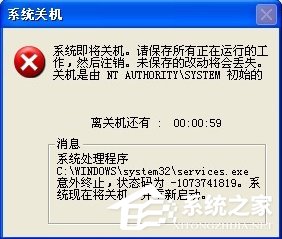
Windows XP Services.exe 意外終止 60 秒倒數關機:VBR 開機區木馬專殺解決

編輯:XP 系統應用技巧

XP 開機彈出「Services.exe 意外終止,系統將在 60 秒後關機」,經典 VBR 引導區木馬 症狀。使用 360 系統急救箱專殺即可解決。

解決步驟

  1. 下載並安裝 360 安全衛士(最新版)
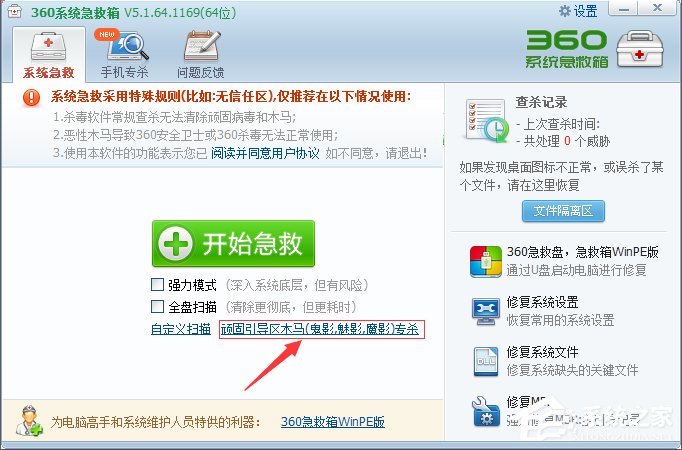
  2. 開啟 360 主介面 → 「功能大全」 → 「系統急救箱」
  3. 在系統急救箱中點擊 「頑固引導區木馬專殺」
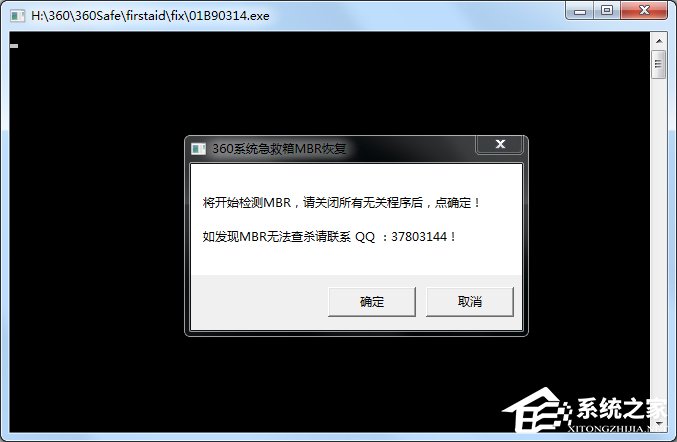
  4. 依提示操作,若檢測到 VBR 木馬會提示修復 VBR
  5. 完成後重開機驗證
Services.exe 意外終止錯誤視窗
360 系統急救箱介面
頑固引導區木馬專殺功能

預防建議

  • 安裝並即時更新專業安全軟體(360、火綠、Huorong 等)
  • 不開啟不明來源檔案、不點擊陌生連結
  • 定期備份重要資料
「VBR 木馬藏身開機磁區,傳統掃毒難查殺,專殺工具直搗黃龍。」
Copyright © Windows教程網 All Rights Reserved