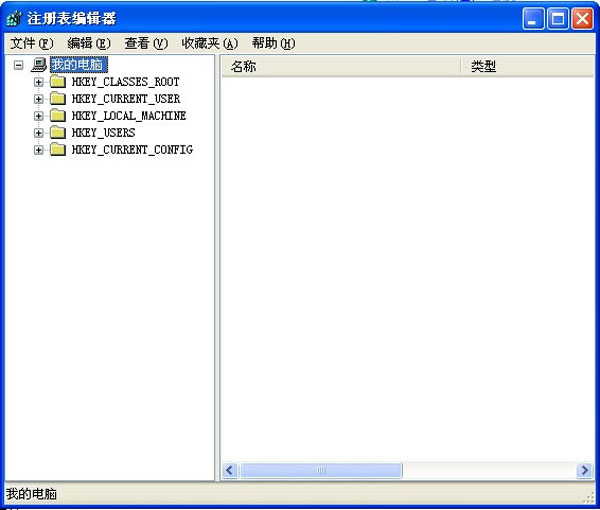
regedit
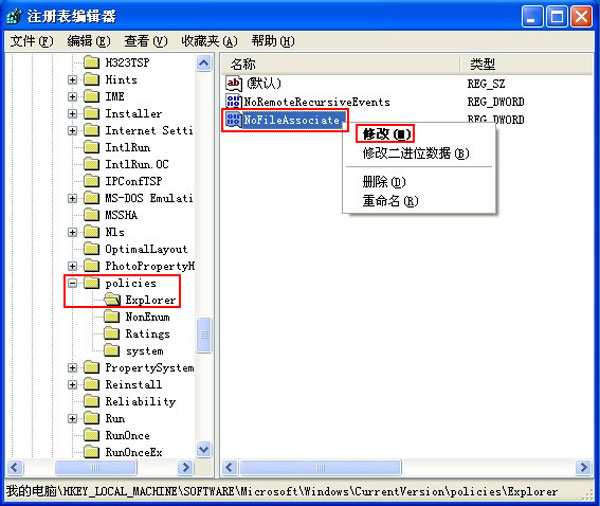
HKEY_CURRENT_USER\Software\Microsoft\Windows\CurrentVersion\Policies\Explorer
HKEY_LOCAL_MACHINE\Software\Microsoft\Windows\CurrentVersion\Policies\Explorer
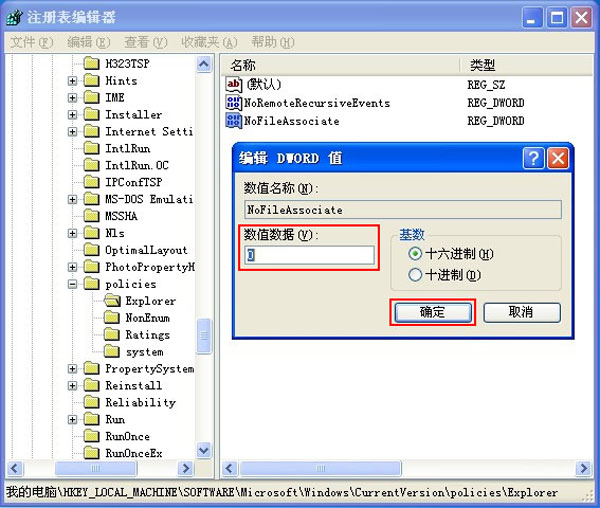
NoFileAssociate
1
Windows XP 系統優化四大經典技巧
Windows XP 超級應用技巧 28 例(上)
WinXP桌面配額不足錯誤?四大原因與對應解決方案
軟體卸載提示「程式正在被使用」無法移除?兩招輕鬆解決
重灌後前置音源孔無聲音?Realtek 高清晰音訊管理器「停用前面板插孔偵測」一鍵修復
註冊表修改即時生效:重啟 Explorer 替代重開機的兩種做法
系統啟動項深度排查:Wininit.ini 與 DOS 環境隱患(下)
Windows 網路共享進階應用:多人同時編輯 Excel、內外網差異化驗證