Windows XP Windows 7 Windows 2003 Windows Vista Windows 綜合教學 Linux 系統教學
Windows 10 Windows 8 Windows 2008 Windows NT Windows Server 電腦軟體教學

WinXP 無法自動更新修復:重新註冊 wups2.dll 並重啟更新服務

編輯:Windows XP 系統介紹

Windows XP 自動更新服務異常(無法檢查/下載/安裝更新),常因核心 DLL wups2.dll 註冊遺失或服務卡死。透過停用更新服務、重新註冊 DLL、重啟服務即可修復。

修復步驟

  1. 「我的電腦」右鍵 → 「內容」→「自動更新」→ 選「關閉自動更新」確定;或 CMD 執行 net stop wuauserv。
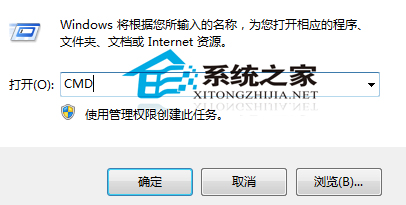
  2. Win + R → cmd 開啟命令提示字元。
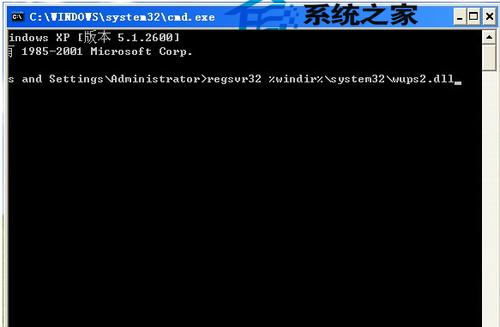
  3. 執行註冊命令(32 位元 XP):
regsvr32 %windir%\system32\wups2.dll

(64 位元 XP/Server 2003 應用 %windir%\syswow64\wups2.dll)

  1. 彈出「DllRegisterServer 成功」視窗點確定。
  2. 重新啟用更新服務:「自動更新」改回「自動」,或 CMD 執行 net start wuauserv。
  3. 進入 Windows Update 檢查是否恢復正常。

CMD 介面

註冊 wups2.dll 成功

補充:若仍失敗,嘗試依序重新註冊 wuapi.dll、wuaueng.dll、wucltui.dll、wups.dll、wuweb.dll,或執行 sfc /scannow 修復系統檔案。

Copyright © Windows教程網 All Rights Reserved