以縮略圖/幻燈片瀏覽圖片、PDF、HTM 時,各資料夾自動產生 Thumbs.db,刪除後重開資料夾又會重生。
Thumbs.db
關閉產生: 「資料夾選項」→「檢視」→勾選「不快取縮略圖」。
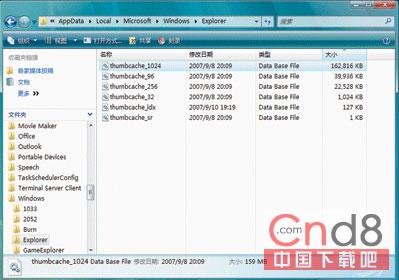
快取集中儲存於: %LocalAppData%\Microsoft\Windows\Explorer\thumbcache_*.db (如 C:\Users\Administrator\AppData\Local\Microsoft\Windows\Explorer\)
%LocalAppData%\Microsoft\Windows\Explorer\thumbcache_*.db
C:\Users\Administrator\AppData\Local\Microsoft\Windows\Explorer\
定期清理可回收可觀磁碟空間。
Windows 7 內建 BitLocker 輕鬆加密 USB 隨身碟,資料安全無憂
讓 Windows XP 自動修復損壞系統檔案:登錄指向硬碟安裝源
SVCHOST.EXE 佔用 CPU 90% 系統卡頓?罪魁禍首竟是自動更新
Windows XP 磁碟分區五大實用技巧:快速分區、拆分合併、NTFS 壓縮、轉換格式、效能優化
XP 系統瘦身加速全攻略 (3):註冊表關閉預設共享、限制匿名連線、強化安全性
Windows 下整合 Tomcat 與 Apache 建置高效能 Web 平台
Windows XP 隱藏控制面板防止誤操作教程
無線路由器當交換機用:關閉 DHCP、接 LAN 口、同網段無縫漫遊