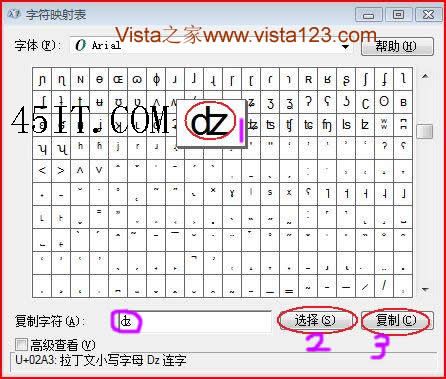
打字需插入特殊符號 (如 ☆、♫、㊣、✿、數學符號、希臘字母等),輸入法難以快速找到。
charmap
💡 進階技巧:字元對應表底部顯示該字元的 Unicode 編碼 (如 U+2606)。若記住常用字元編碼,可在支援的編輯器中直接輸入 Alt++2606 (需登錄啟用十六進位鍵盤) 或使用輸入法的 Unicode 輸入功能。
2606
解決 Windows Vista 磁碟機代號錯亂問題:完整修復指南
Vista 藍畫面自動重開機?修改登錄讓它停下來方便除錯
安裝 Windows Vista 前必檢:十大硬體需求清單
Vista Beta 2 極致優化實測:開機僅 20 行程、佔用 180MB 記憶體、平常使用 <350MB 完整設定截圖
Vista 系統非常態下的資料備份與還原技術:Windows Complete PC 與 WinRE 硬碟安裝法
巧妙備份解決 Vista 雙系統重裝後續啟動問題:BCD 與引導檔案完整備份還原指南
解決 Vista 下《跑跑卡丁車》無法運行/藍屏問題
Vista C 槽可用空間持續縮水?兩招釋放空間(保留最近還原點/關閉系統還原)