查詢本機 IP 不必鑽網卡屬性,鍵盤流最愛:Win+R → cmd → ipconfig,瞬間顯示所有網卡 IPv4/IPv6 位址、子網路遮罩、預設閘道。
C:\Users\User>ipconfig

Windows IP 設定

乙太網路介面卡 區域連線:
   連線特定的 DNS 尾碼 . . . . . : local
   IPv4 位址 . . . . . . . . . . . : 192.168.1.100
   子網路遮罩 . . . . . . . . . . . : 255.255.255.0
   預設閘道 . . . . . . . . . . . . : 192.168.1.1
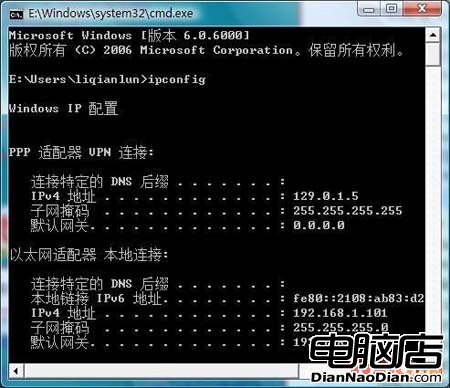
Vista 命令提示字元 ipconfig 輸出範例
ipconfig /all:顯示完整資訊(MAC 位址、DHCP 租約、DNS 伺服器等);ipconfig /release / /renew:釋放/更新 DHCP 租約;ipconfig /flushdns:清除 DNS 快取;ipconfig /displaydns:顯示 DNS 快取內容。Get-NetIPAddress 或 gip(別名);熟記 Win+R → cmd → ipconfig,網路除錯第一步,永遠最快。