Vista 登入驗證比 XP 嚴格,忘記密碼很難進入系統。但登入介面存在「沾滯鍵」漏洞:按五下 Shift 會啟動 sethc.exe。利用雙系統環境,可在 XP 下將 Vista 的 sethc.exe 替換為 cmd.exe,進而重設密碼。
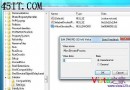
D:\Windows\System32,右鍵 sethc.exe →「內容」→「安全性」→「進階」→「擁有者」分頁,將擁有者改為目前 XP 登入帳號。sethc.exe 屬性「安全性」分頁,點「新增」將 XP 帳號加入並給予「完全控制」權限。rename D:\Windows\System32\sethc.exe sethc1.execopy D:\Windows\System32\cmd.exe D:\Windows\System32\sethc.exeexplorer.exe 載入桌面,即可在開始選單看到系統內建 Administrator 帳號,進而重設或建立新帳號密碼。sethc.exe 恢復原狀,避免安全隱患。刪除 Vista 系統殘留分區文件(NIFS/Windows.old 等)的權限突破技巧
Vista/Longhorn TCP/IP 堆疊增強對實際檔案傳輸效能的衝擊:跨資料中心 201GB 傳輸從 12Mbps 飆升至 400Mbps+
解決 Vista CPU 100% 佔用:TrustedInstaller.exe (Windows 模組安裝程式) 為主因,關閉自動更新或改為手動服務
Vista 無法存取 Linux Samba 共享?調整 LAN Manager 驗證等級破解 NTLMv2 衝突
Vista 螢幕右側偏暗/偏黑?那是 Windows 側邊欄漸層特效非故障