Windows Vista 全面重寫 TCP/IP 協定堆疊,原生支援 IPv6。想知道 IPv6 版的 127.0.0.1 長什麼樣?只要一條指令即可揭曉。
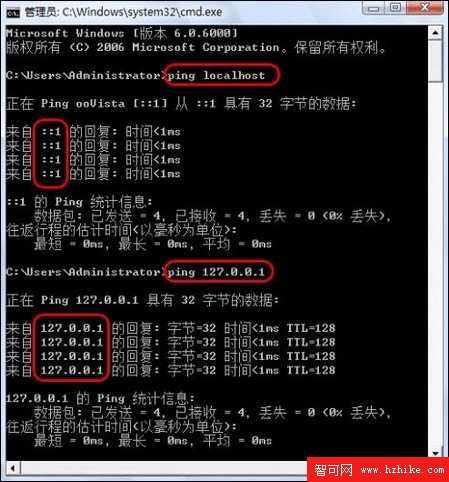
cmd 按 Enter 開啟命令提示字元。ping localhost 按 Enter。::1 (IPv6 回環位址),而非傳統 127.0.0.1。
查看 C:\Windows\System32\drivers\etc\hosts 可見預設內容:
::1         localhost
127.0.0.1   localhost
Vista 解析 localhost 時優先回傳 IPv6 位址 ::1,導致 ping localhost 預設走 IPv6 路徑。
| 指令 | 回應位址 | 封包大小 | 往返時間 | TTL |
|---|---|---|---|---|
ping localhost | ::1 | 32 bytes | <1ms (平均 0ms) | — (IPv6 無 TTL 欄位,改用 Hop Limit) |
ping 127.0.0.1 | 127.0.0.1 | 32 bytes | <1ms (平均 0ms) | 128 |
兩者本機回環效能相當,差異僅在協定版本。若需強制 IPv4 測試,直接指定 ping 127.0.0.1 或 ping -4 localhost。