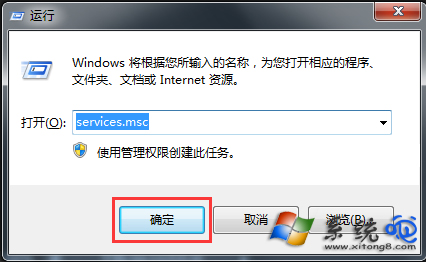
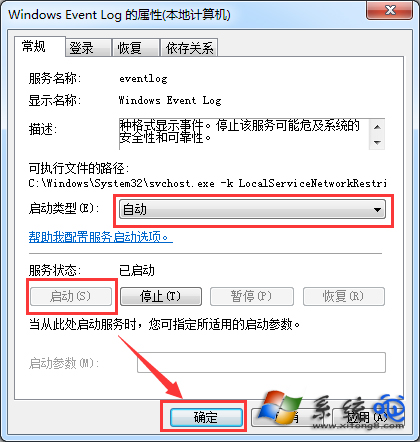
撥號上網出現「錯誤 1717」,主因是 Windows Event Log 服務未執行。一分鐘修復:
services.msc
若仍異常,重新開機讓服務生效。此法適用 Win7/8/10/11。
工作列音量圖示消失?三大成因與對應修復:啟用設定、補回 sndvol32.exe、登錄恢復啟動項
Nginx 高效能伺服器配置檔核心指令詳細釋義
下載極快但線上看影片卡頓?五步驟排查:病毒、專用緩衝器、瀏覽器快取、硬體加速、DNS
電腦死機不再怕:25 條鐵律預防指南,穩定運行不是夢
利用登錄映像劫持(IFEO)反制病毒:將計就計讓惡意程式失效
USB 隨身碟故障修復與資料救援實戰:磁碟管理初始化、主控芯片供電修復、壓縮檔搶救
Windows 藍畫面死機 (BSOD) 成因分析與 6 大排除對策
Tomcat 虛擬路徑配置與定時掃描刪除惡意 WAR 檔案的 Java 實作方案