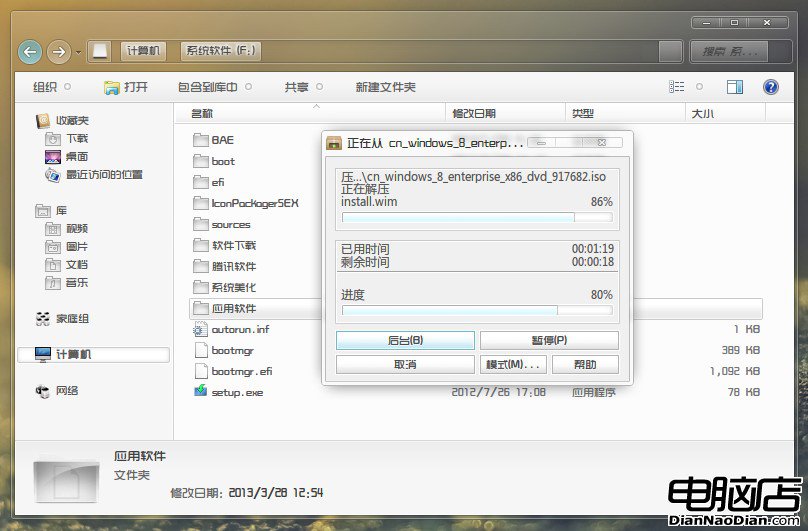
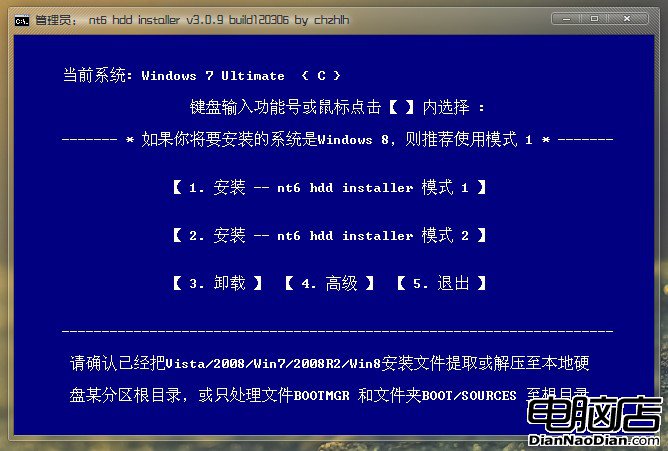
針對沒有光碟機或 USB 隨身碟的使用者,NT6 HDD Installer 提供了極便利的硬碟安裝方案。即使有光碟機,許多進階用戶也偏好這款工具,因為它同時支援 x86 與 x64 架構,能將 C 槽格式化為乾淨系統,亦可建立多重開機環境,安裝過程如同使用光碟般直觀,無需進入修復模式輸入指令。
Windows 7 列印效能低落修復補丁 KB2295825 釋出
Canalys 預測微軟 2014 年平板市佔可達 5%,三大 OS 合併為必要
WP10/Win10 早期版本現身:微軟向合作夥伴分發測試版
微軟確認Windows 10周年更新正式版將於7月發布:Cortana郵件提醒功能同期上線
Windows 8 安裝完整圖文教學與實測心得
蘋果將 Android 4.1 Jelly Bean 列為侵權產品,專利戰升級直指谷歌
Windows 10 應用商店持續出現登入、下載問題 修補程式後仍未解決
Win10 正式版 10240 收到三枚補丁更新 KB3081448/449/452 累積性修復