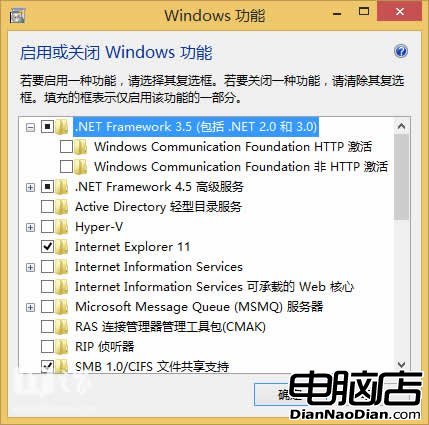
Win8.1預裝.NET 4.5.1,舊程式需3.5支援可自動啟用。三種安裝法:
DISM /Online /Enable-Feature /FeatureName:NetFx3 /All /LimitAccess /Source:d:\sources\sxs,無需網路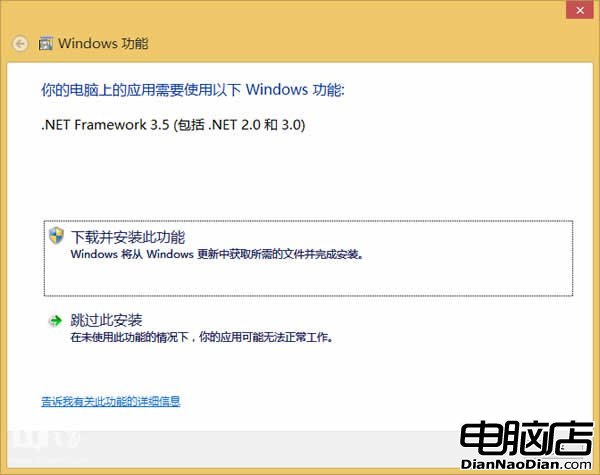
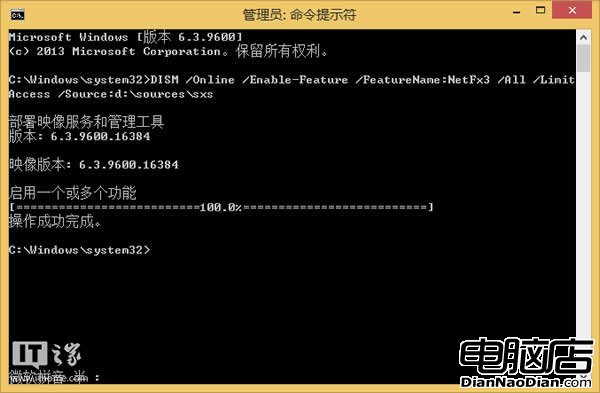
注意:安裝語言包前必須先裝3.5;3.5不再含Windows CardSpace。
微軟將為 Win10 提供「快速」與「穩定」兩種更新通道:Opt-in 優先獲取新功能,Lock-down 針對企業環境僅推安全更新
McAfee預測2013年Windows 8將面臨大量惡意攻擊:釣魚網站需警惕
微軟 Windows 8 Pro 漲價至 1988 元:無奈之舉還是自絕後路?
微軟詳細解讀 Windows 10 激活方式:數位授權與產品金鑰雙軌制
Windows 8/RT 將迎來更多新應用:Bing 應用團隊擴展開發陣容
Office 365 家庭高級版訂閱突破 200 萬,企業客戶從 Google Apps 回流 440 家