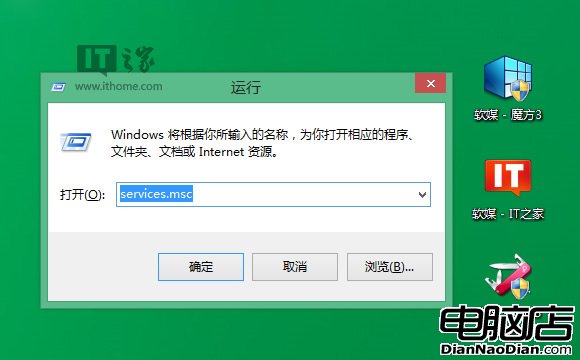
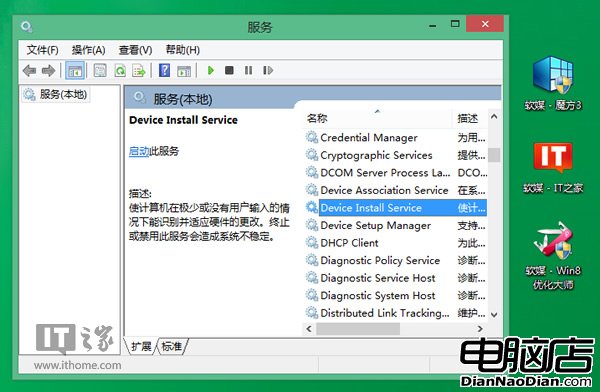
精簡版 Win8/8.1 安裝驅動常跳「資料無效」,主因是硬體裝置管理服務被停用。解決方法:
services.msc
net start DeviceInstall
net start DsmSvc
此外,安裝 Apple 行動裝置支援、建行網銀盾驅動亦需啟用對應服務(Smart Card)。操作後驅動安裝不再報錯。
Win10「應用商店」將顯示應用上一次更新時間
Surface RT 降價 30% 後的悲傷故事:銷量未見起色 讀者反應冷淡
Windows 8重裝系統不再煩惱:重置/刷新雙模式,數據保留與徹底清除任選
微軟 CFO:短期內難見 Windows 8 版 iTunes 應用
Win7/8.1 升級 Win10 藍屏 DPC_WATCHDOG_VIOLATION 6 步解決教學
Windows 8.1 中國售價公布:核心版 988 元、專業版 1988 元,Win 8 用戶免費升級
Win 8 「還原電腦」與「重設電腦」實測:能救受損系統,但無法完全取代 Ghost
Win8 移除內建 DVD 播放,Media Center 變付費附加包,主攻網絡媒體播放