Windows XP Windows 7 Windows 2003 Windows Vista Windows 綜合教學 Linux 系統教學
Windows 10 Windows 8 Windows 2008 Windows NT Windows Server 電腦軟體教學
您现在的位置: Windows教程網 >> Windows教程 >  >> Windows 綜合教學 >> Windows 資訊

如何查看 Win8.1 WinSxS 文件夾實際大小:DISM 工具一鍵分析

編輯:Windows 資訊

WinSxS 位於 C:\Windows,存儲系統備份、更新補丁,隨時間成長為系統盤最大文件夾。資源管理器顯示大小因硬鏈接技術(同一文件多目錄顯示不佔額外空間)而虛高,難以反映真實佔用。
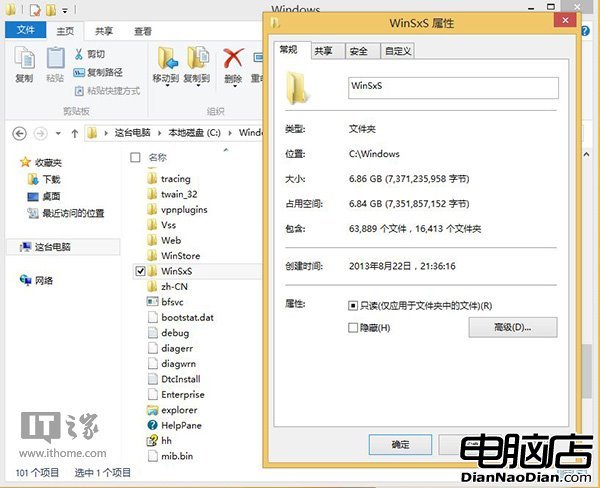
Win8.1 內置 DISM 工具可精準查詢實際大小:
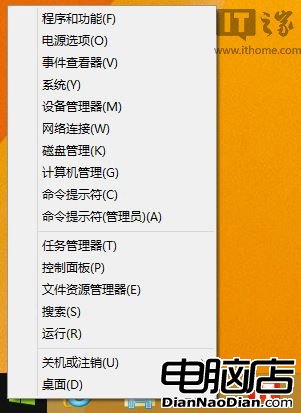
  1. 右鍵開始按鈕選「命令提示符(管理員)」。
  2. 輸入命令:
    Dism.exe /Online /Cleanup-Image /AnalyzeComponentStore
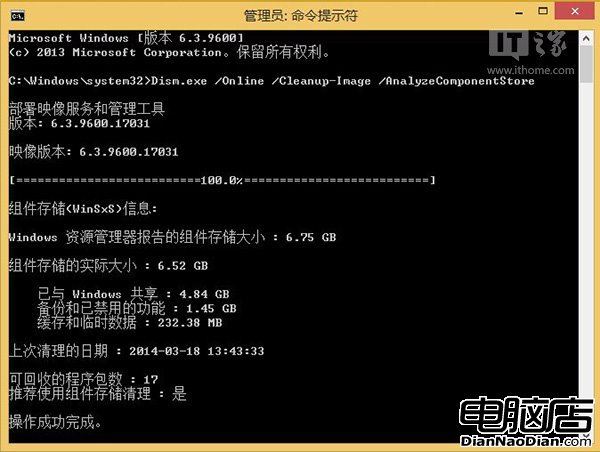
結果顯示實際容量低於資源管理器數據。WinSxS 主要由三部分組成:與 Windows 共享、備份與禁用功能、緩存臨時數據。註:僅支援 Win8.1,Win7 不適用。

Copyright © Windows教程網 All Rights Reserved