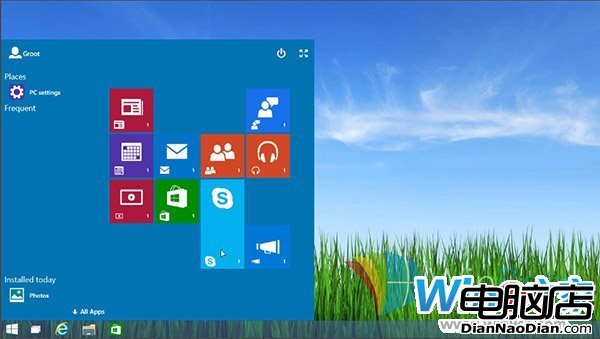
Build 9879 發現早期 Continuum 模式開始螢幕,僅限平板,Bug 多預設關閉。註冊表解鎖法(同 ID 48601):
HKEY_LOCAL_MACHINE\Software\Microsoft\Windows \CurrentVersion\ImmersiveShell\Launcher\
UseExperience
1
恢復:值改 0 重啟 Explorer。早期版崩潰頻發,謹慎使用。
0
微軟 4G LTE 版 Surface 2 價格曝光:679 美元、較非 LTE 版貴 130 美元、高於諾基亞 Lumia 2520
Windows Phone 市佔連跌五季,微軟能否逆風翻盤?
NetApplications:12月Windows份額回升擺脫半年連跌,Win8增至1.64%、Win7破45%
微軟全新 Fresh Paint 隨 Windows 8.1 登場
Windows 8 開發者預覽版首批更新補丁釋出
正版Windows告別盒裝版 中國僅保留預裝與官網下載兩渠道
善用 Win7 ClearType 技術,螢幕閱讀更護眼
股民老李的 Win7 故事:善用 UAC 設定擋流氓軟體,炒股零干擾