Windows XP Windows 7 Windows 2003 Windows Vista Windows 綜合教學 Linux 系統教學
Windows 10 Windows 8 Windows 2008 Windows NT Windows Server 電腦軟體教學
您现在的位置: Windows教程網 >> Windows教程 >  >> Windows 綜合教學 >> 關於 Windows

Win7 開啟/關閉搜尋記憶功能:群組原則保護隱私防止搜尋歷史外洩

編輯:關於 Windows

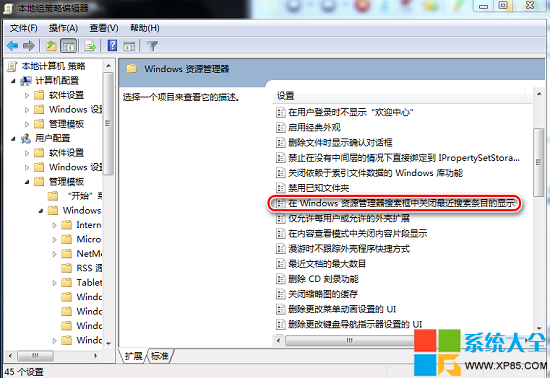
Win7 搜尋框會記錄歷史關鍵字並自動建議,方便但可能洩露隱私。透過群組原則可關閉「在 Windows 檔案總管搜尋框中關閉最近搜尋項目的顯示」。

設定步驟

    1. Win + R → gpedit.msc → 確定。 2. 左側依序:本機電腦原則 → 使用者設定 → 管理範本 → Windows 元件 → Windows 檔案總管。 3. 找到 「在 Windows 檔案總管搜尋框中關閉最近搜尋項目的顯示」 → 雙擊。 4. 選 「已啟用」 → 確定 → 關閉群組原則編輯器。
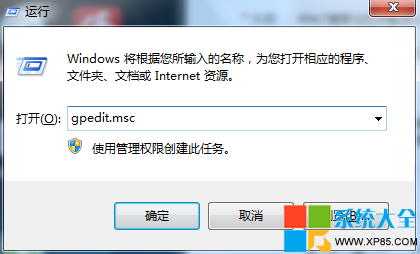
執行 gpedit.msc
圖 1:執行 gpedit.msc

搜尋記憶原則
圖 2:啟用關閉最近搜尋項目顯示

設定生效後,搜尋框不再顯示歷史關鍵字,保護個人搜尋隱私。需恢復時將原則設為「未設定」或「已停用」。

Copyright © Windows教程網 All Rights Reserved