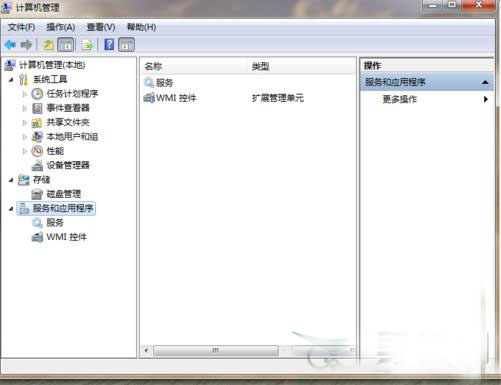
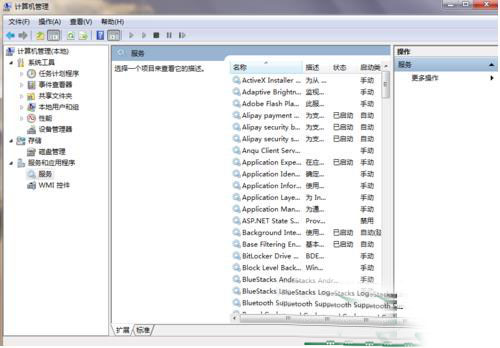
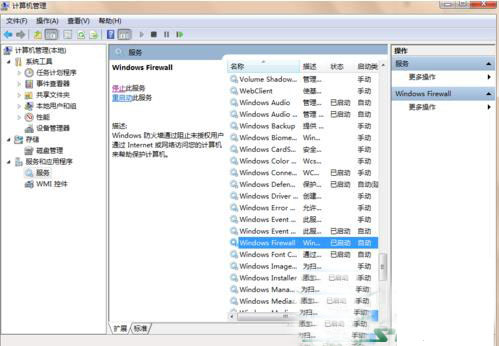
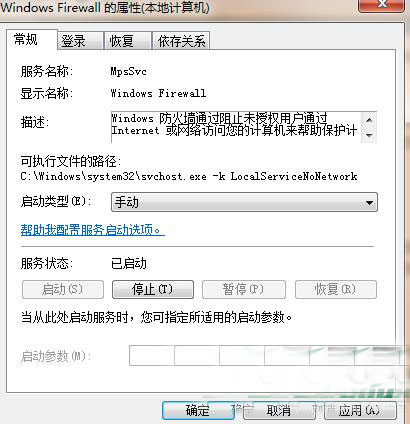
系統防火牆需開機自動啟動才能主動防禦。設定方法:
設定完成後防火牆將隨系統自動啟動,提供即時防護。
Win10 10565 激活新政:可直接用 Win7/8.1 密钥激活,无需先升级再重装
Win7 旗艦版連接無線網路完整設定教學:從控制台到 IP/DNS 手動配置
Win7 系統下 Epson R230 印表機清零教程:解決 DLL 錯誤的兼容模式技巧
Win10 Mobile 10536 照片 App 新支援動態影像:豐富捕捉編輯 + Living Images 原生播放
XP 升級 Win10 僅需 $39.99?限 32 位家庭版、數位下載、正版用戶專屬
Win7 如何查看顯示卡型號?兩種內建工具快速檢視教學
Windows 8 遺失 VC++ 執行階段 DLL (MSVCP/MFC/ATL) 解決方法:電腦管家一鍵修復
Win7 關閉螢幕放大鏡與取消開機自動啟動:快速鍵與設定面板雙重教學