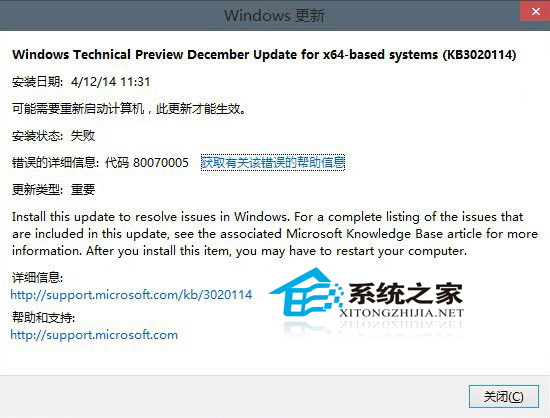
Windows 10 Technical Preview Build 9879 存在檔案總管頻繁崩潰問題,微軟釋出補丁 KB3020114 修復,但部分使用者回報安裝失敗。官方後續提供了解決步驟。
CMD
compact /u /exe /s:%windir%\winsxs\filemaps
微軟工程師 Gabriel Aul 指出,根本修復仍需時間,建議內測使用者持續關注後續更新。
Windows Server 2008 R2 RODC 部署規劃全攻略:唯讀網域控制器設計考量
Win10 工作檢視有什麼用?虛擬桌面多工管理:新增/切換/關閉桌面,視窗總覽一目了然
Windows XP 設定靜態 IP 位址加快開機速度完整教學
Win10 Mobile 14342.1003 更新體驗:穩定性提升、Edge 手勢回歸
Win10 如何查看螢幕重新整理率?三步驟快速確認是否正常
Win8.1 滑鼠與觸控板手勢失效?驅動重裝與安全模式排查教學
Windows 10 升級時 EDIUS 6 不相容的解決方案:先解除安裝再裝支援 Win10 的 EDIUS 7.5
Win7 開機錯誤代碼 parity check 2 故障分析與解決:硬體檢查為主