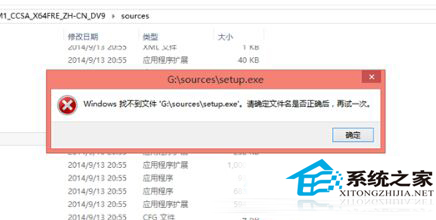
现象:在 32 位 Win10 下双击 64 位 ISO 内 `setup.exe` 报错:
Windows 找不到文件 'G:\sources\setup.exe' 请确定文件名是否正确后,再试一次
原因: 32 位进程无法加载 64 位可执行文件 (WoW64 仅支持 32 位应用在 64 位系统运行,反向不支持)。
解决: **制作 U 盘/光盘启动介质,从固件引导 (UEFI/Legacy) 全新安装 64 位 Win10**。无法在 32 位环境原地升级到 64 位。
补充: 32 位系统仅识别 ~3.25 GB 内存,64 位支持 128 GB+。现代硬件 (4 GB+ 内存/新 CPU) **强烈建议直接安装 64 位版**,32 位仅适配极老旧设备 (2 GB 内存/32 位仅 CPU)。