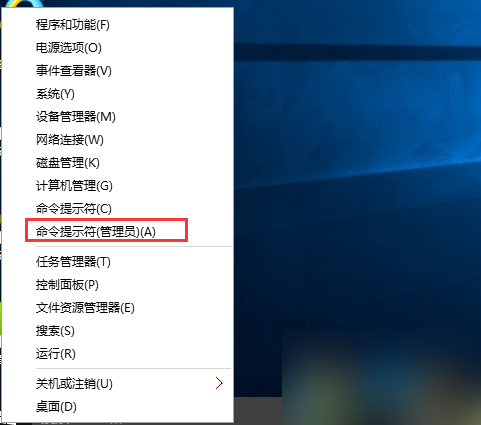
Win10 預設保留「英文 (美國) 美式鍵盤」(ENG),國人鮮用卻佔據切換順序。刪除步驟:
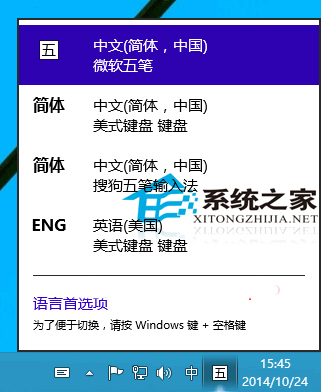
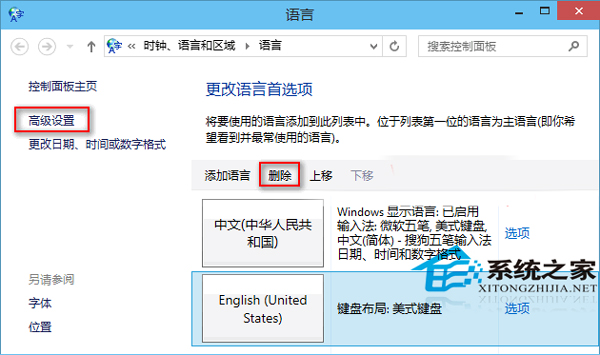
刪除後可另行安裝慣用輸入法(如搜狗),體驗更順手。
Win8 IE11 将网页保存到阅读列表:共享魅力栏 → 阅读列表 → 添加,稍后阅读不迷路
Win8.1 安裝 Office 365 錯誤 30125-1011 (404)?手動指定 DNS 4.2.2.2/4.2.2.1 或換時間點重試
Windows 10 取消開機密碼:netplwiz 自動登入設定教學
Win10 Build 9926 全新地圖應用:離線下載、3D 視圖與周邊探索
WinXP 備份 IE 收藏夾:檔案 → 匯入和匯出 → 匯出收藏夾 → 選擇資料夾 → 存為 .htm 檔
Win10 Build 10565 更新內容總覽:Skype 整合、Edge 標籤預覽、Cortana 手寫識別、標題列配色、開始選單新圖示、裝置啟用機制改進
Win8 全螢幕截圖自動存檔:Win+PrtSc 一鍵儲存至圖片庫/螢幕擷取畫面
Windows 7/8.1 透過 Windows Update 直接無縫升級至 Windows 10 Build 9926 教學