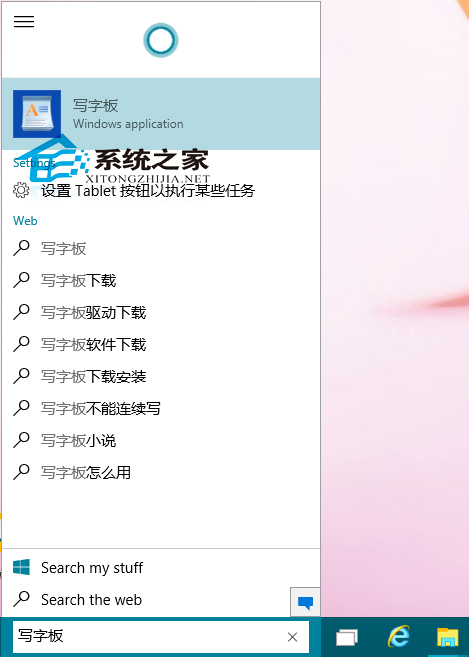
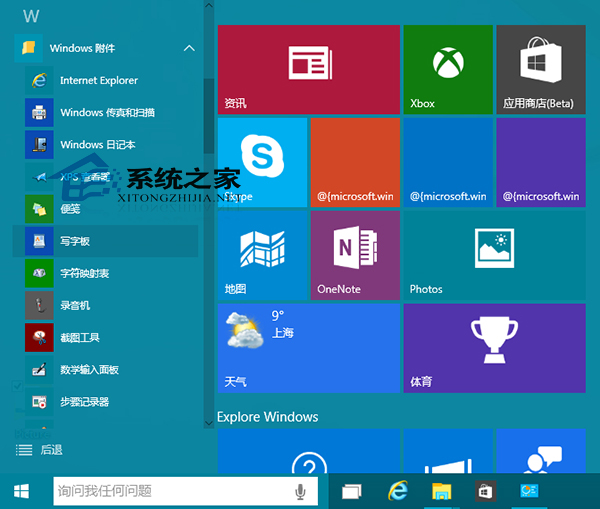
Windows 10 內建寫字板處理文字編輯,兩種開啟法:
雖使用頻率不如計算機、畫圖,但關鍵時刻好用。
Windows 10 Build 10147:Edge 瀏覽器獲得暗色模式,系統 UI 細節調整
Win 10 Build 10041 升級 10061 卡住?註冊表修改大法助你順利更新
Win10 系統如何更改預設瀏覽器?告別 IE 輕鬆切換 Chrome、Edge 或其他瀏覽器
Windows 10 遊戲相容性實測:8 款熱門大作全數通過,但啟動鎖遊戲需先解鎖
[下載] Win10 10240 傳統計算機應用程式網盤下載(64/32 位)
Win7 執行程式提示「libeay32.dll 遺失」四種修復方案
Win10 Build 10061 英文版 ESD 官方下載連結(需解密金鑰)
Win10 Mobile 10536.1004 安裝 Android APK 暫時失效:Project Astoria 相容性問題待修復