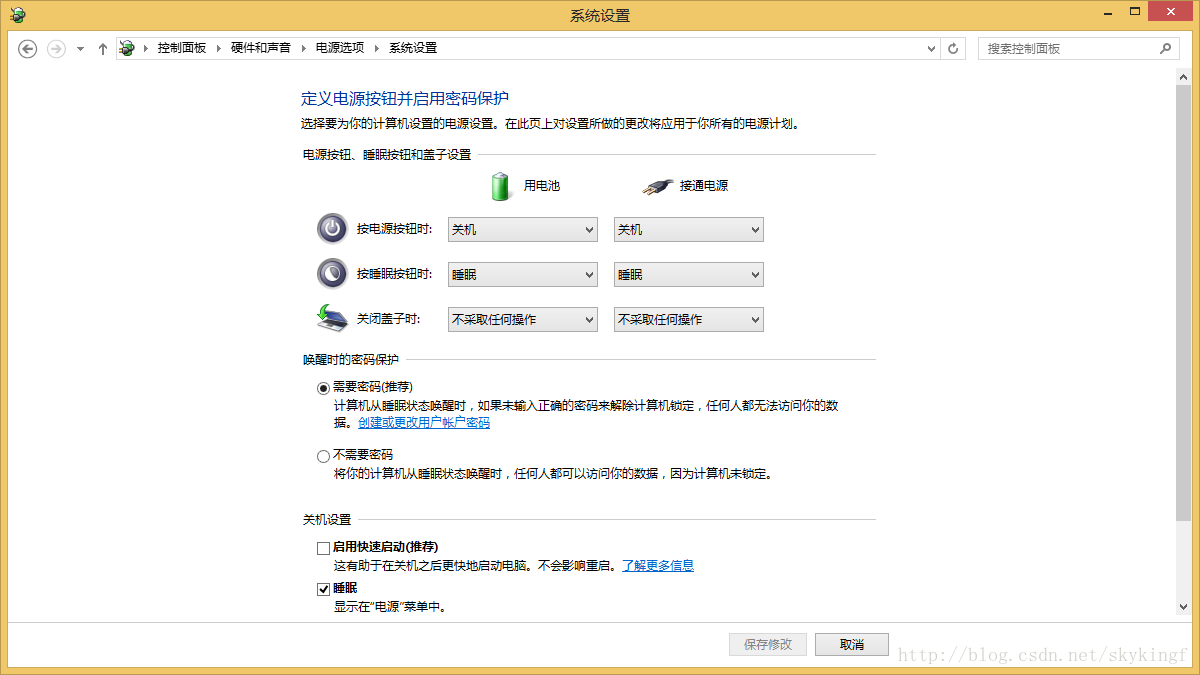
Win8.1 點關機實際進入混合休眠(快速啟動),滑鼠鍵盤一動即喚醒。解決:關閉快速啟動實現真正關機。
之後關機即為完全關機,不再因輸入裝置喚醒。
Win10 Mobile Build 10051 上手體驗影片:流暢度提升但仍未達正式版水準、Spartan 瀏覽器有趣但難用
Win10 10240 免金鑰安裝 RTM 後內測版:需於已啟動裝置上升級
微軟詳解 Win10 相容性三大面向:應用、裝置、設定,升級前必讀
Win8 取消 Metro 開始畫面:登錄檔新增 RPEnabled=0 重開機即可
Acer W4 Win8.1 平板執行 FIFA 14 閃退排查:乾淨啟動法隔離第三方干擾
Win10 無法執行魯大師?相容性設定兩步驟解決
Win7 玩《永恆之塔》如何降低 Ping 提升速度?註冊表修改 TCP 參數教程
Win7 程式庫無法加入網路資料夾?必須滿足三大前提條件:聯網、存密碼、啟用離線檔案