微軟推送 Win10 10166,Edge 瀏覽器獲得新應用 ID,導致舊版 Spartan 瀏覽器的收藏、Cookie、歷史、閱讀清單升級後遺失。升級前請備份:
%localappdata%/Packages/Microsoft.Windows.Spartan_cw5n1h2txyewy/AC/Spartan/User/Default/Favorites(%localappdata% 指 X:\Users\用戶名\AppData\Local)。%userprofile%/Favorites(IE 收藏夾位置 X:\Users\用戶名\Favorites)。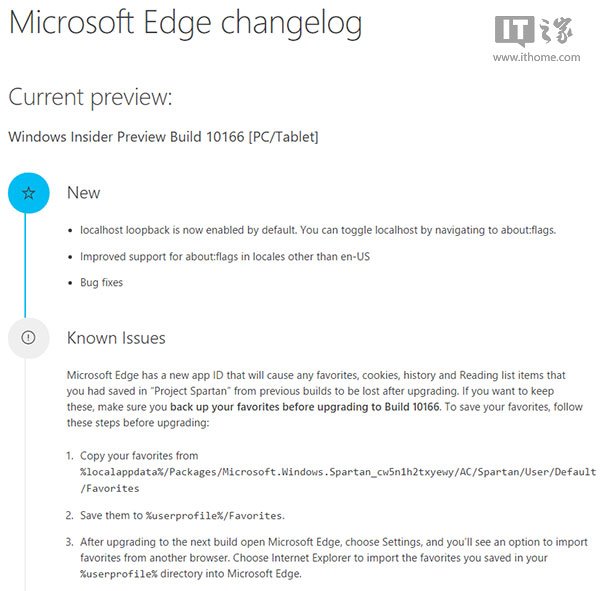
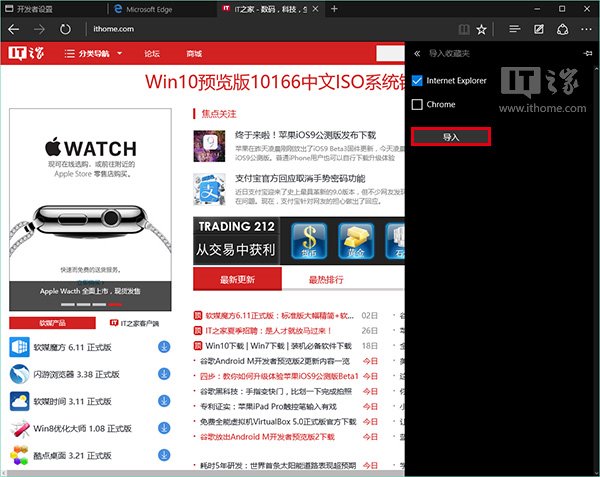
已知改進: 本地主機回環預設開啟(about:flags 切換)、提升非美式英文地區 about:flags 支援。
Windows 10 安裝 Google Earth Pro 完整教學:繞過安裝阻擋、啟動應用程式
Win7 360 瀏覽器提示「無法正確開啟您的個人資料」雙重修復法
Win10 安裝 KB3116869 更新失敗 0x80004005?重置防火牆 + 批次重新註冊 DLL 徹底修復
平板/電腦 Windows 應用全螢幕切換:開始選單啟動 → 右上角雙向箭頭 → 工作列右鍵還原
Win10 圖片檢視器全螢幕模式:F11 進入幻燈片、ESC/右鍵退出
注意!Windows 10 所有內部預覽版金鑰已失效:全新安裝無法啟用,建議等待正式版釋出