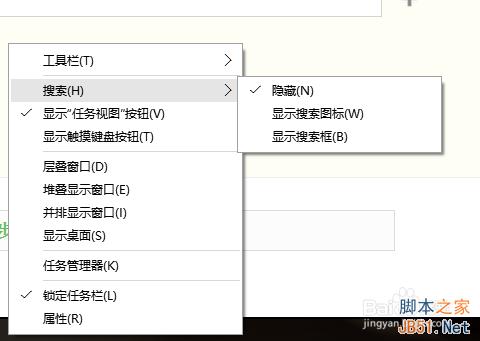
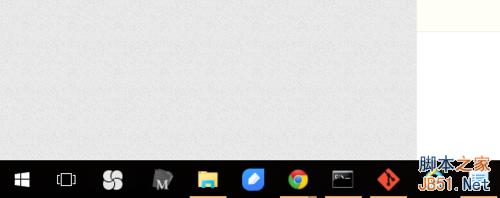
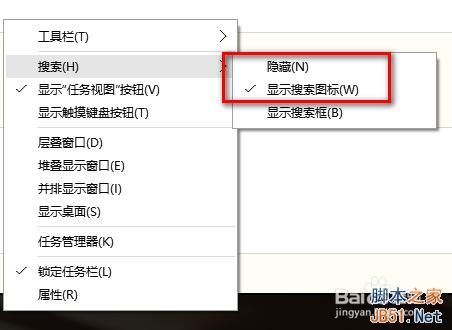
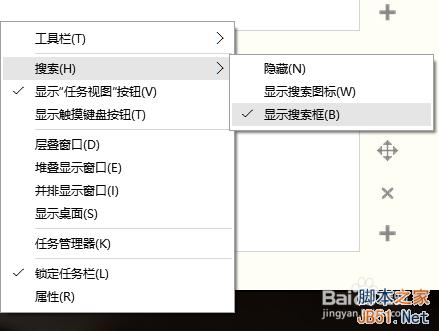
Windows 10 預設在工作列顯示完整搜尋方塊,佔據空間較大,尤其筆記型電腦螢幕較小時顯得擁擠。其實只需兩步驟即可切換為「搜尋圖示」模式,既美觀又節省空間。
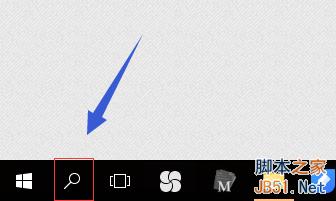
搜尋方塊即縮為放大鏡圖示,點擊後再展開輸入介面。
Win10 如何安裝 Windows 平板版 QQ 4.0 內測版?PowerShell 側載安裝完整教學
解決 Windows 10 開啟 Word 畫面全黑問題:登錄檔修復預設白色背景
Win7 隱藏系統分區 (C 槽) 兩種方法:群組原則與磁碟管理
Win10 新功能確認:開始選單與開始畫面融為一體,可調整大小功能將回歸
Win8.1 明明已啟動卻一直提示啟動?重新安裝啟動碼指令解決
硬碟容量「縮水」之謎:Win7/Win8 缺失磁碟空間去哪了?
Windows Server 2008 部署 IIS、FTP、Oracle 服務筆記
系統備份方法效用深度分析:Ghost 一鍵還原、PE 克隆、光碟刻錄、行動硬碟實測心得