Windows XP Windows 7 Windows 2003 Windows Vista Windows 綜合教學 Linux 系統教學
Windows 10 Windows 8 Windows 2008 Windows NT Windows Server 電腦軟體教學
您现在的位置: Windows教程網 >> Windows教程 >  >> Windows 綜合教學 >> 關於 Windows

Windows 7 桌面圖示不顯示/顯示異常?重建圖示快取 (IconCache.db) 徹底解決

編輯:關於 Windows

Windows 7 開機後桌面圖示消失、顯示白紙/錯誤圖示,主因為圖示快取檔 IconCache.db 損毀。透過工作管理員結束 explorer.exe,命令提示字元刪除快取檔並重啟 Explorer 即可修復。

修復步驟

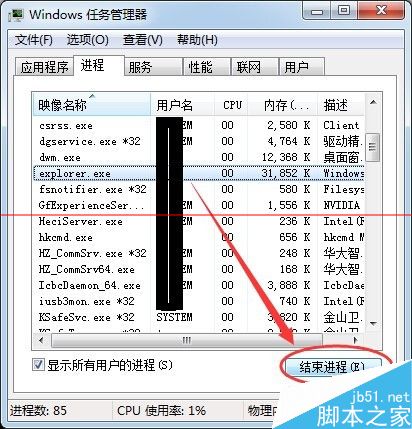
  1. 開啟工作管理員:Ctrl+Alt+Del → 「啟動工作管理員」或任務列右鍵。
    工作管理員
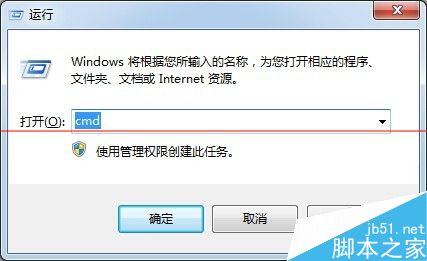
  2. 開啟命令提示字元:Win+R → cmd 或開始選單搜尋。
    執行 cmd
    搜尋 cmd
  3. 在工作管理員「處理程序」頁籤結束所有 explorer.exe (可能有多個)。
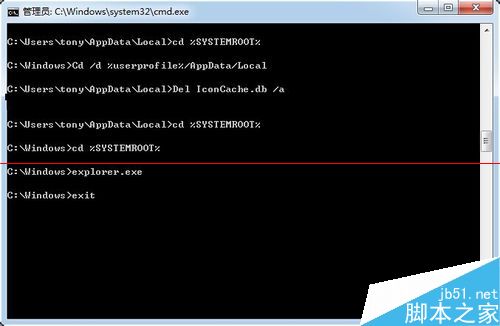
  4. 在命令提示字元依序執行:
    cd /d %userprofile%\AppData\Local
    del IconCache.db /a
    cd %SYSTEMROOT%
    explorer.exe
    exit
    
    命令執行
    修復後桌面

原理說明

  • %userprofile%\AppData\Local\IconCache.db 存放圖示快取,損毀導致圖示讀取失敗。
  • 結束 Explorer 釋放檔案鎖定,刪除快取檔,重啟 Explorer 觸發自動重建。
  • cd %SYSTEMROOT% 切換至系統目錄確保 explorer.exe 正確啟動。

適用範圍

  • Windows 7 / 8 / 8.1 / 10 (路徑相同) 均適用。
  • 圖示顯示白紙、錯誤圖示、延遲顯示、捷徑圖示異常。

進階:批次檔自動化

@echo off
taskkill /f /im explorer.exe
cd /d %userprofile%\AppData\Local
del IconCache.db /a
start explorer.exe
exit

存為 RebuildIconCache.bat 以系統管理員執行即可一鍵修復。

Copyright © Windows教程網 All Rights Reserved