Windows 10 從商店安裝的 Office (UWP 版) 若出現無法啟動、閃退,通常是 ClipSVC (Client License Service) 授權快取異常。需停止服務、備份/刪除授權快取檔案、重新安裝 Office 應用。
license.bat(儲存類型選「所有檔案」):@echo off
net stop clipsvc
if "%1"=="" (
echo ==== BACKING UP LOCAL LICENSES
move %windir%\serviceprofiles\localservice\appdata\local\microsoft\clipsvc\tokens.dat %windir%\serviceprofiles\localservice\appdata\local\microsoft\clipsvc\tokens.bak
)
if "%1"=="recover" (
echo ==== RECOVERING LICENSES FROM BACKUP
copy %windir%\serviceprofiles\localservice\appdata\local\microsoft\clipsvc\tokens.bak %windir%\serviceprofiles\localservice\appdata\local\microsoft\clipsvc\tokens.dat
)
net start clipsvc
license.bat。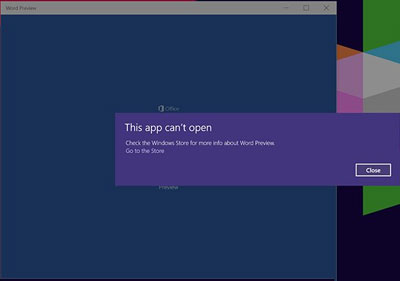
此法針對 UWP 版 Office 授權快取問題,傳統 MSI/點擊執行版 Office 不適用。若問題持續,建議改用 Office 365 桌面版或傳統安裝版。