Windows XP Windows 7 Windows 2003 Windows Vista Windows 綜合教學 Linux 系統教學
Windows 10 Windows 8 Windows 2008 Windows NT Windows Server 電腦軟體教學
您现在的位置: Windows教程網 >> Windows教程 >  >> Windows 綜合教學 >> 關於 Windows

Win10 應用程式商店點擊軟體即閃退?清除快取或重建本地帳號修復

編輯:關於 Windows

Win10 應用程式商店可開啟,但點選軟體詳情頁即閃退,常見原因為快取損毀或使用者設定檔異常。兩種修復方案:

方案一:清除商店快取

  1. Win+R 輸入 wsreset.exe 執行。
  2. 命令提示字元視窗自動跑完關閉,商店重新開啟即完成快取重置。

方案二:重建本地帳號並綁定 Microsoft 帳號

  1. 「設定 → 帳號 → 家庭與其他使用者」→ 新增本地帳號。
  2. 以新帳號登入,綁定原 Microsoft 帳號。
  3. 刪除舊帳號(備份資料後),再以新帳號登入使用商店。
多數情況下方案一即可解決;若無效再嘗試方案二。
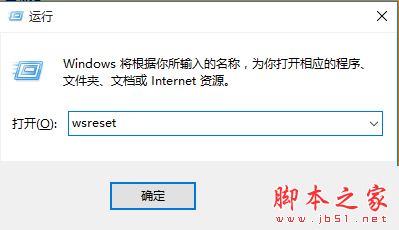
執行 wsreset.exe

Copyright © Windows教程網 All Rights Reserved