Windows XP Windows 7 Windows 2003 Windows Vista Windows 綜合教學 Linux 系統教學
Windows 10 Windows 8 Windows 2008 Windows NT Windows Server 電腦軟體教學
您现在的位置: Windows教程網 >> Windows教程 >  >> Windows 綜合教學 >> 關於 Windows

Win7 如何查詢連接埠號?CMD 指令 netstat -na 一鍵列出所有連接埠狀態

編輯:關於 Windows

快速查詢法

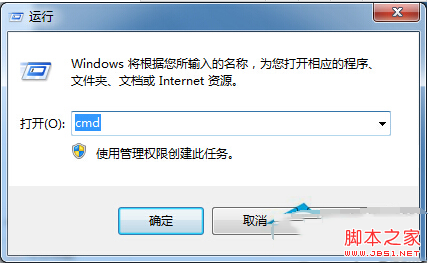
  1. 按 Win+R 開啟「執行」,輸入 cmd 按 Enter 開啟命令提示字元。
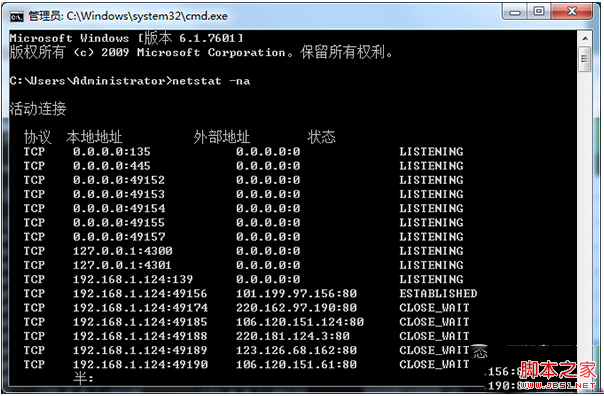
  2. 輸入指令:
    netstat -na
    按 Enter 執行。
  3. 畫面即列出所有通訊協定 (TCP/UDP)、本機位址、外部位址、狀態 (LISTENING/ESTABLISHED/TIME_WAIT 等) 與對應的連接埠號。

執行 cmd

netstat -na 輸出結果

常用參數說明

  • -n:以數值顯示位址與連接埠號(不解析主機名稱,速度較快)。
  • -a:顯示所有連線與監聽連接埠。
  • -o:顯示擁有連線的程序 ID (PID),可搭配 tasklist 查詢對應程式。
  • -b:顯示建立連線的執行檔名稱(需系統管理員權限)。

進階篩選範例

  • 僅看 TCP 監聽埠:netstat -na | findstr "LISTENING"
  • 查詢特定埠 (如 80) 是否被佔用:netstat -na | findstr ":80"
  • 查看 PID 對應程式:netstat -nao | findstr "PID號" → tasklist | findstr "PID號"


Copyright © Windows教程網 All Rights Reserved