regedit 開啟註冊表編輯器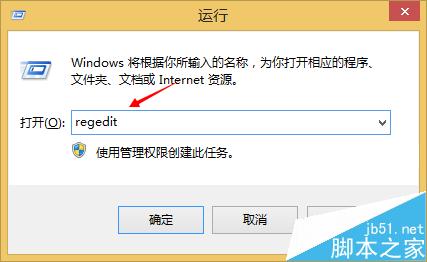
HKEY_LOCAL_MACHINE\SOFTWARE\Microsoft\Windows\CurrentVersion\Policies\System\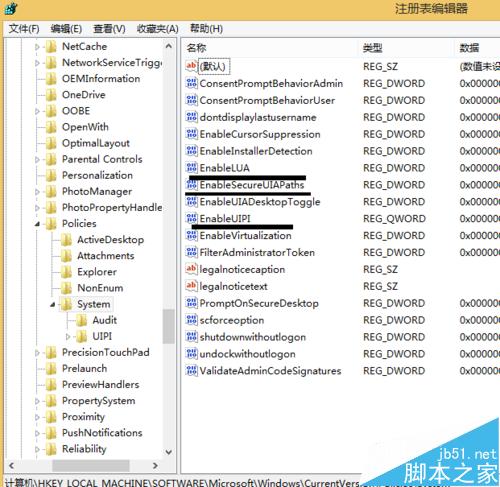
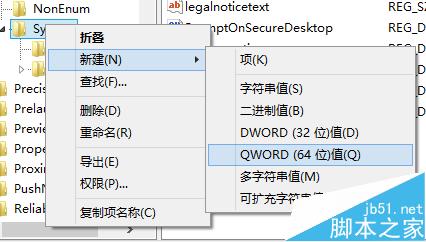
EnableUIPI = 0
EnableLUA = 0
EnableSecureUIAPaths = 0
注意:修改完成系統通常會提示重開機。此修改會降低 UAC/UIPI 安全防護層級,建議僅在必要時使用,並注意來源不明檔案的拖曳操作風險。
Win7 開機黑屏「Windows failed to start」KAVBootc.sys 錯誤完整排查與修復方案
Windows 10 Build 10102 工作列通知區域圖示顯示/隱藏完整設定教學
Windows 8 記憶體洩漏導致黑屏/死機/卡頓排查:任務管理員鎖定洩漏進程、SSD 相容性疑慮、SuperFetch/ExpressCache 服務影響
Win32 轉制 Win10 UWP (Project Centennial) 完整優勢清單:動態磚、通知、乾淨安裝、商店變現、跨裝置推廣
Win8.1 Firefox 開啟天貓提示「您的連線並不安全」解決辦法:Ctrl+F5 強制重新整理