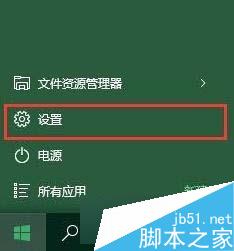
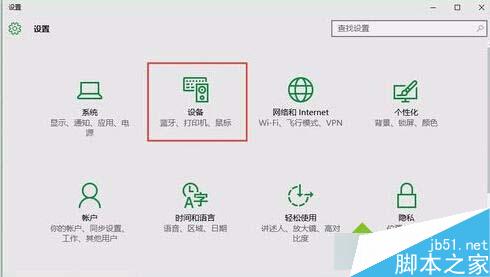
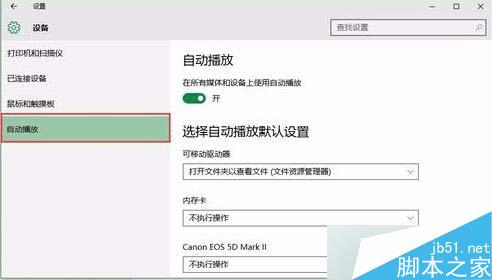
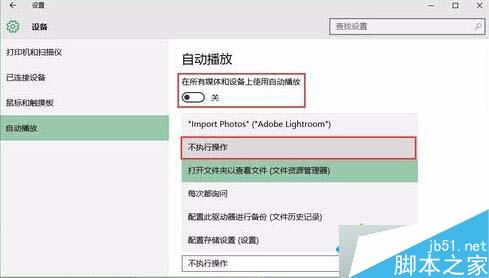
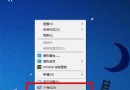
設定完成後,插入 USB/行動硬碟不再自動彈出檔案總管,需手動開啟即可,避免干擾工作流程。
Win10啟用瀏覽器雲端同步:多裝置同步書籤、密碼、設定教學
Windows 8 找不到開始資料夾?真實路徑與開啟方法
Win8 玩 LOL 跳出「關閉程式以防止資訊遺失」?三招解決記憶體不足與磁碟空間問題
Win10 系統第三方瀏覽器裝哪款最合適?2345、360、QQ、UC、百度、金山、搜狗七款參數對比與優缺點分析
下載:Windows 10 Build 10122 中文 64 位 ISO(網友封裝)
Build 10100 現身內測:Win10 版本號跳躍為 Build 2015 大會準備?
Win10 Alt+Tab 切換任務如何隱藏開啟視窗?註冊表修改 wallpaper 值直接顯示桌面
Windows 虛擬記憶體 pagefile.sys 刪除與移動完整教學:透過系統設定操作,勿手動刪除檔案