Windows 8 沒有內建資料夾加密功能(EFS 僅支援專業版/企業版且操作複雜),推薦使用第三方工具「易捷資料夾加密軟體大師 v3.65」:
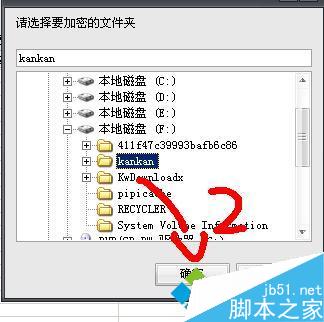
加密後資料夾需輸入密碼才能存取,有效保護隱私資料安全。軟體體積小(2.73MB),操作直觀易上手。
Win10 D 槽變成「我的文件」怎麼辦?還原預設位置或移動回目標資料夾
微軟延長 Skylake 平台 Win7/8.1 支援至 2023 年:企業客戶鬆一口氣
Win9 技術預覽版下載頁面意外曝光:暫稱 Windows TH,32 位元超過 3GB
Windows 10 IoT Core 物聯網版正式釋出:免費下載、支援 Raspberry Pi 2 與 MinnowBoard Max
Windows 10 專業版 Build 10551 系統截圖曝光:Edge 瀏覽器重大升級、書籤同步、WHQL 簽名強制載入 DLL