升級 Word 2016 後檔案圖示顯示異常 (空白/錯誤圖示)。修復方法:
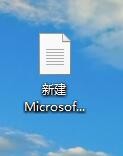
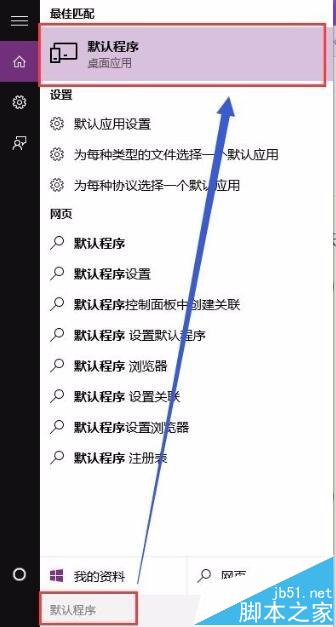
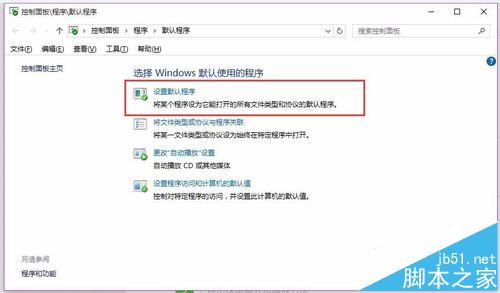
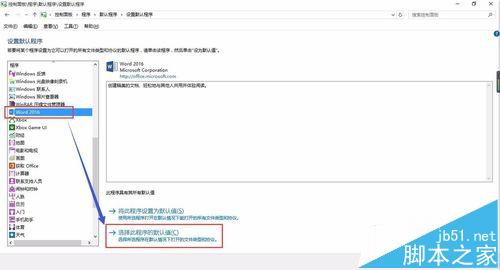
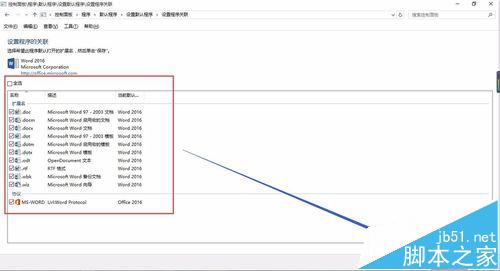
所有檔案圖示異常均可用此法修復,避免重裝 Office。
Windows 7 無法在同一視窗開啟多個資料夾解決方案:資料夾選項設定與登錄修復雙管齊下
Win10 Mobile Build 10586.29 更新內容全覽:修復升級體驗、Edge、藍牙、雙卡、短信等問題
Win10 檔案總管導覽列隱藏可移除裝置?登錄搜尋法快速定位修改
Windows 10 開始選單與工作列概念設計圖:Groove 音樂動態磚採用互動式設計、Cortana 風格 UI、白底灰圖新視覺
Windows 7 寬頻網路加速技巧:修改 TCP 接收視窗大小提升傳輸效率
Windows 7 slmgr 指令重設授權延長試用期至 360 天
Win8 提示「音訊裝置有問題,一或多個音訊服務未執行」?登錄編輯 Audiosrv RequiredPrivileges 保留 SeChangeNotifyPrivilege