Windows XP Windows 7 Windows 2003 Windows Vista Windows 綜合教學 Linux 系統教學
Windows 10 Windows 8 Windows 2008 Windows NT Windows Server 電腦軟體教學
您现在的位置: Windows教程網 >> Windows教程 >  >> Windows 綜合教學 >> 關於 Windows

Win10 11099 開機彈窗 WSClient.dll 錯誤?任務排程器禁用刷新任務徹底根治

編輯:關於 Windows

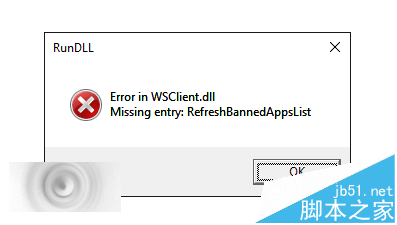
升級 Win10 11099 後開機頻繁彈出 WSClient.dll 錯誤:找不到項目 RefreshBannedAPPsList。微軟 Gabriel Aul 建議用 wsreset 重置應用商店,但網友發現透過「工作排程器」禁用對應任務更徹底,四步完成永不再彈窗。
操作步驟

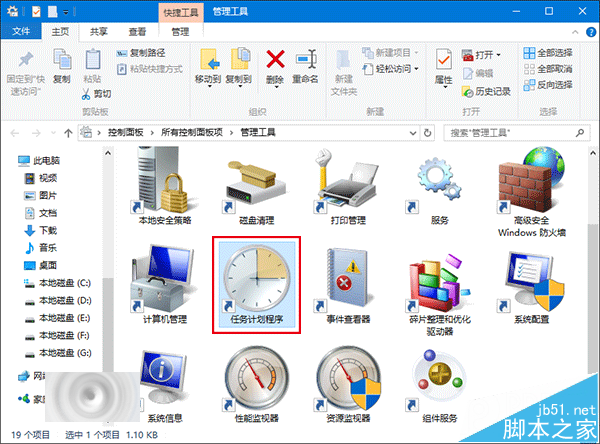
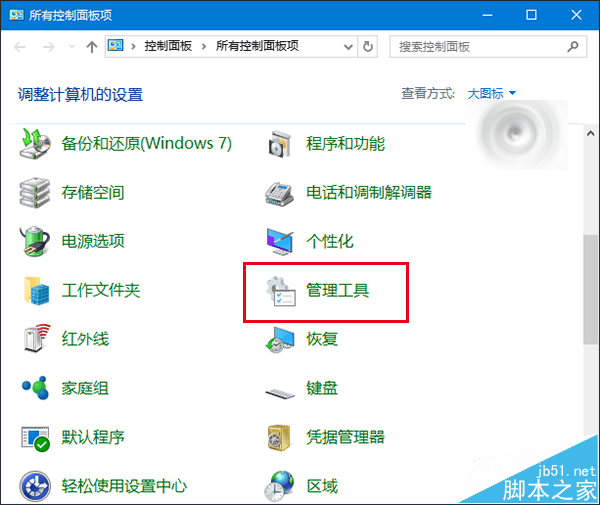
  1. 右鍵「開始」→「控制台」→「系統管理工具」→「工作排程器」。
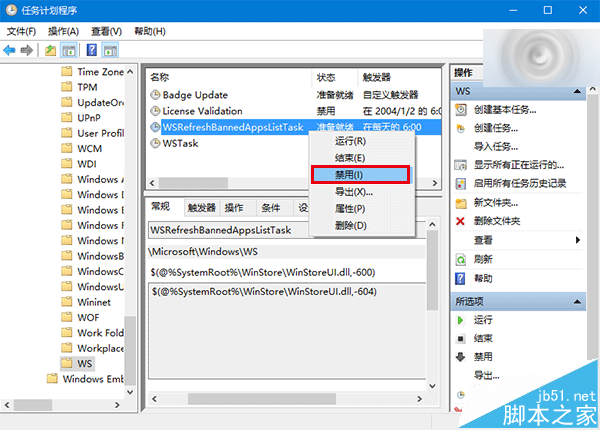
  2. 左側樹狀目錄依序展開:工作排程器程式庫 → Microsoft → Windows → WS。
  3. 找到 WSRefreshBannedAppsListTask,右鍵 → 停用。

原理:禁用該排程任務後,禁止應用程式清單不再同步,彈窗根因消失。若微軟未來修復可再啟用。比 wsreset 更徹底有效。

相關推薦: Win10 11099 升級後出現 WSClient.dll 錯誤怎麼辦?

Copyright © Windows教程網 All Rights Reserved