Windows XP Windows 7 Windows 2003 Windows Vista Windows 綜合教學 Linux 系統教學
Windows 10 Windows 8 Windows 2008 Windows NT Windows Server 電腦軟體教學
您现在的位置: Windows教程網 >> Windows教程 >  >> Windows 綜合教學 >> 關於 Windows

Win10 小娜語音關機/重啟/登出/休眠?建立關機捷徑讓 Cortana 執行 shutdown 指令

編輯:關於 Windows

Cortana 內建不支援語音關機等系統操作,但可利用「執行捷徑」特性:在開始功能表建立命名為「關機」、「重啟」等的捷徑,目標指向 shutdown.exe 參數,即可語音控制。

建立捷徑步驟

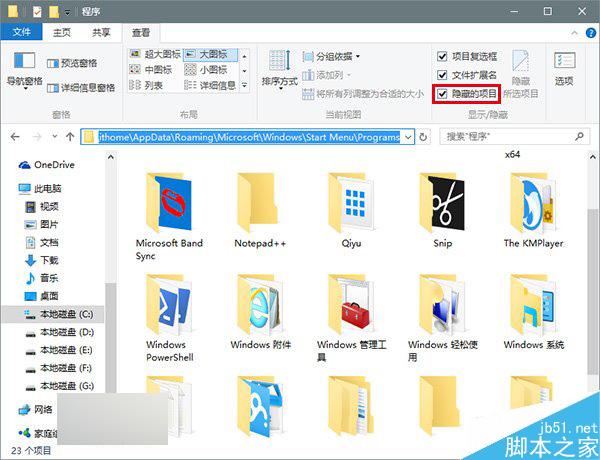
  1. 開啟檔案總管 →「檢視」→ 勾選「隱藏的項目」。
  2. 進入 C:\Users\<用戶名>\AppData\Roaming\Microsoft\Windows\Start Menu\Programs。
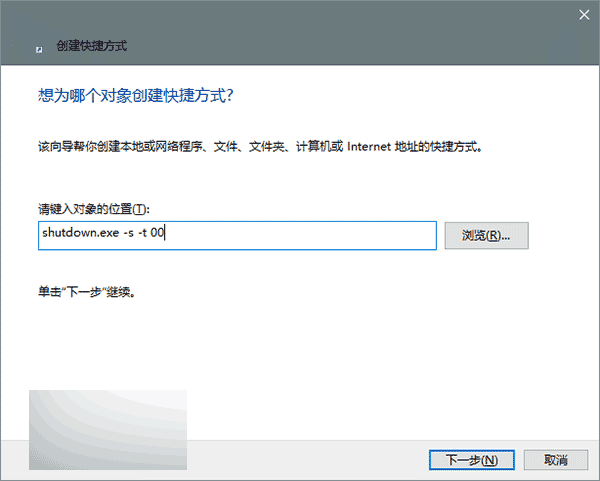
  3. 右鍵空白處 →「新增」→「捷徑」,位置輸入指令:
    • 關機:shutdown.exe -s -t 00
    • 重啟:shutdown.exe -r -t 00
    • 休眠:shutdown.exe -h
    • 登出:shutdown.exe -l
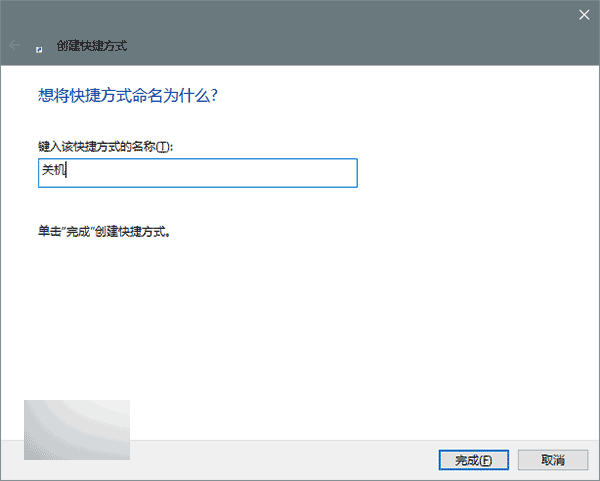
  4. 命名為「關機」/「重啟」/「休眠」/「登出」。

語音指令格式

必須說:「你好小娜,打開『關機』」(關鍵字「打開」不可省略)。同理可說「打開『重啟』」等。

微軟官方尚未內建語音關機前,此為最簡便替代方案。

Copyright © Windows教程網 All Rights Reserved