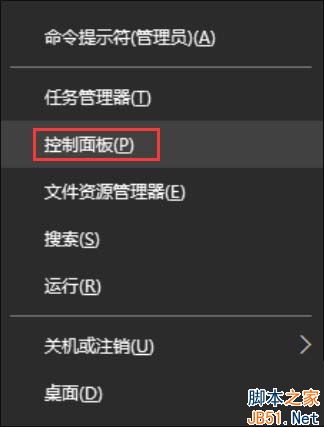
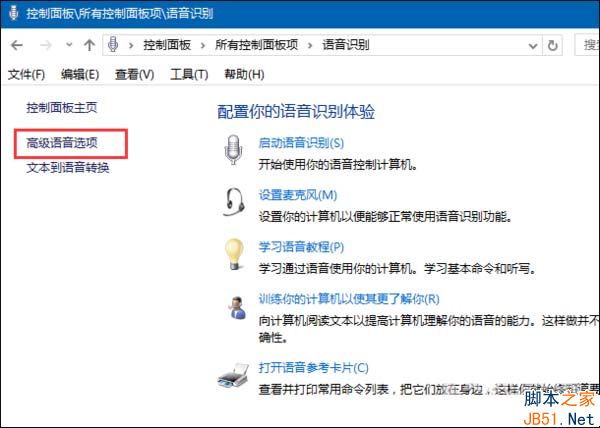
Windows 10 同樣內建語音辨識功能,若未優化系統,每次開機會自動啟動。不需此功能的用戶可依下列步驟關閉。
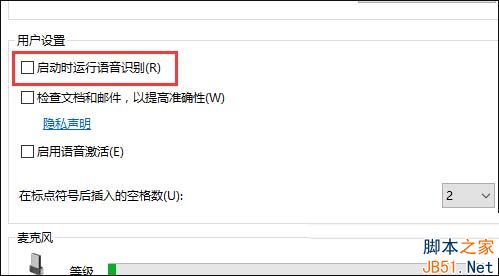
類似功能性組件還有許多,建議搭配專業第三方優化工具,讓 Win10 維持最佳狀態。更多內容請持續關注本站!
Win10 預覽版安裝完整指南:ISO 鏡像四大玩法與多種安裝方法詳解
Win10 累積更新 KB3197954 (Build 14393.445) 內部測試中,修復眾多 Bug 即將推送
XP 系統 Temp 暫存資料夾自動清理:批次檔 + 群組原則關機腳本
Win10 Build 10064 介面曝光:暗黑風格統一、Task View 圖示變白、回收站懷舊風
Windows 10 確認原生支援 8K 解析度,螢幕需 27 吋以上
Windows 10 技術預覽版深度評測:免費升級、Spartan 瀏覽器、Cortana 整合三大亮點