升級 Win10 後網速變慢,主因系統預設啟用 TCP 自動調諧為後台更新保留頻寬,實際卻未充分利用。關閉此功能可釋放完整頻寬。
netsh int tcp set global autotuninglevel=disabled執行成功即生效,無需重開機。

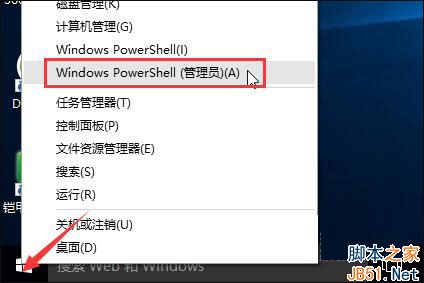
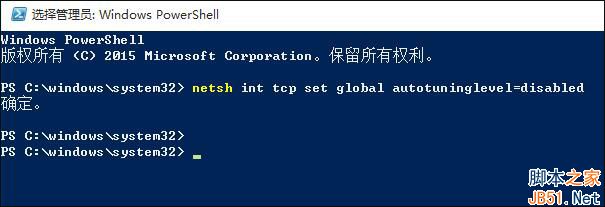
若後續需恢復,執行 netsh int tcp set global autotuninglevel=normal 即可。亦可搭配第三方網路監控工具暫時限制更新下載頻寬。
Win10 Mobile RS2 預覽版 14904 升級截圖曝光,內測中正式版推送後再推
Win10 專業版運行變慢卡頓?10 招優化加速:碎片整理、啟動項、服務、驅動、SSD、記憶體全方位提速
Win10 Mobile 14372 預覽版導致 Microsoft Band 2 耗電嚴重、通知不同步問題
Win10 系統怎麼關閉 Superfetch 服務?禁止 Superfetch 自啟動教程
Win8 與 Win10 哪個好?性能對比詳細評測:差異極小無需擔心
搜狗官方回应:Win10 下无法安装输入法因签名吊销,已下架整改后将上线