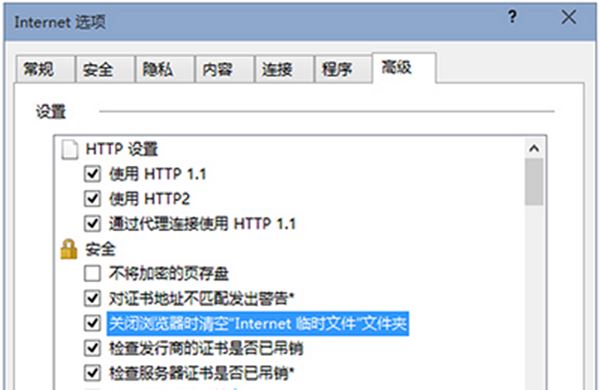
IE 瀏覽網頁會產生大量暫存檔,久了佔用空間拖慢系統。Win10 內建選項可在關閉瀏覽器時自動清空,設定極簡單。
此外,磁碟機內的系統暫存資料夾(%temp%)也建議定期手動清理。更多優化技巧請關注本站。
%temp%
史上最簡單 Win10 10041 升級 10061 教學:註冊表修改 + 服務重置 完整圖文步驟
Win8.1 一鍵進入休眠模式捷徑建立教學:rundll32 指令法
Win10 Build 15002重磅功能:專業版/企業版/教育版可暫停更新35天,驅動更新獨立控制
Windows 7 停用檔案總管搜尋方塊歷史記錄教學
Win10 畫圖應用大變身:經典 MSPaint 全面現代化,UWP 版「Newcastle」曝光
XP 系統用 Windows Media Player 瀏覽圖片:開啟檔案選所有類型即可播放幻燈片
Win10 PC 預覽版 14955 修復與已知問題彙整:量角器筆跡、精確觸控板、講述人、USB、Edge 等大量改進
Win10 網頁載入緩慢?啟用瀏覽器快取提升載入速度圖文教學