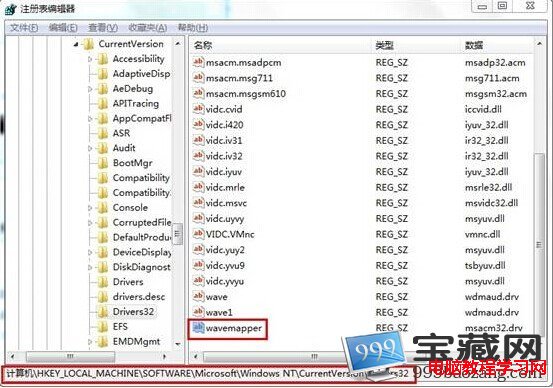
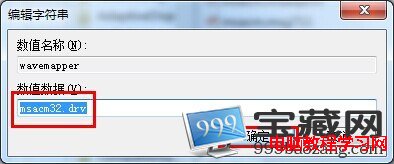
Win7 本地播放正常但網頁視訊/音樂無聲,通常是登錄檔 HKEY_LOCAL_MACHINE\SOFTWARE\Microsoft\Windows NT\CurrentVersion\Drivers32 遺失 wavemapper 字串值。新增並設值 msacm32.drv 重開機即可修復。
regedit → 定位 HKEY_LOCAL_MACHINE\SOFTWARE\Microsoft\Windows NT\CurrentVersion\Drivers32。wavemapper,無則右鍵空白處 →「新增」→「字串值」→ 命名 wavemapper。wavemapper → 數值資料設為 msacm32.drv → 確定。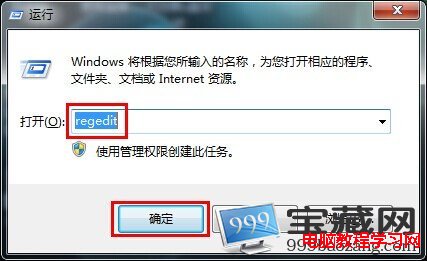
Win7 無法關機、開始選單沒關機選項?群組原則啟用關機命令
Win8 關閉遠端桌面防駭客:控制台→系統→遠端設定→勾選「不允許遠端連線」
Win7 無法調節螢幕亮度?註冊表啟用 KMD_EnableBrightnessInterface2 修復 Fn 鍵/滑桿失效
Windows 10 悄悄進入準正式版:Build 10147 安裝流程曝光 (版本選擇、金鑰、激活、升級)
Windows 10 週年更新 14393.187 累積更新修復內容彙整
Win7 聽音樂看影片突發爆音雜音?登錄刪除 MMCSS 解決多媒體服務優先級衝突
Windows 8 系統自動登入設定教學:免輸入密碼直接進入桌面
Windows 10 回收站圖示能否固定在任務列?官方僅提供入口,第三方小工具 MiniBin 可在系統匣顯示容量並操作