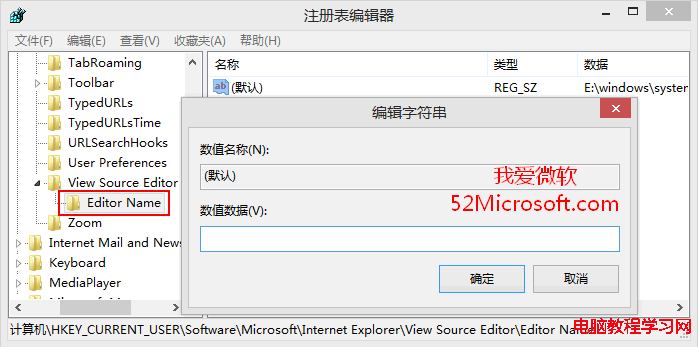
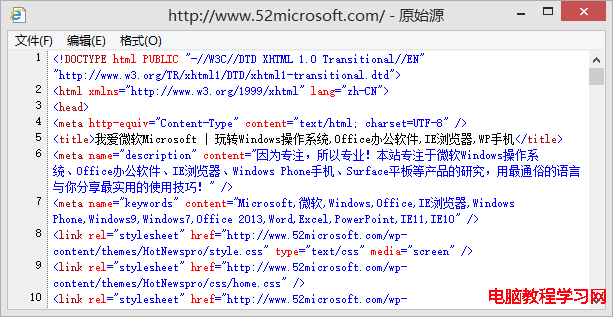
若曾將 IE「檢視原始碼」的 HTML 編輯器改為記事本/Word/Excel,想恢復預設內建檢視器,只需清空登錄檔對應鍵值。
regedit
HKEY_CURRENT_USER\Software\Microsoft\Internet Explorer\View Source Editor\Editor Name
此設定為每用戶配置,不影響其他使用者帳號。
Windows 7 中文版免重裝切換英文/多國語言介面 (MUI) 教學
Windows 10 家庭版 vs 專業版:核心差異、價格落差與選購建議
Windows XP ipconfig 指令完整使用教學:查看 IP、DNS、MAC、釋放續租、清除 DNS 快取
Win8 搜狗瀏覽器提示「已修改網頁以防禦跨站腳本」解決方案
Win10 Mobile 應用商店新 UI 曝光:更美觀、支援兌換碼與禮品卡,週年更新先行推送
Windows Hello 深度解析:告別密碼時代,臉部/虹膜/指紋一鍵登入 Win10
Win7 找不到「執行」指令?兩招快速喚出與固定到開始選單
Windows 10 vs Windows 7:穩定性、相容性、新功能全面比較 該不該升級?