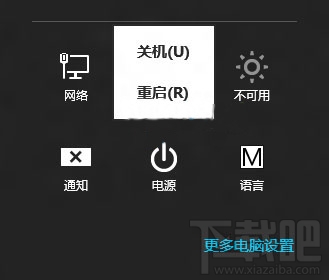
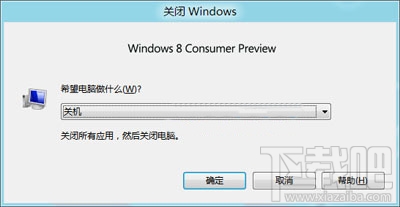
Win8 移除傳統開始選單,關機入口隱藏較深。四種標準關機法:① 滑鼠移至左下角 → 開始選單 → 設定 → 電源 → 關機(或 Win+I → 電源)。② 傳統桌面按 Alt+F4 → 關機選單(最快)。③ 機殼電源鍵(需控制台電源選項設定「按電源鍵時:關機」)。④ Win+L 鎖定 → 向上滑動解鎖畫面 → 右下角電源鍵。進階:建立 shutdown -s -t 0 批次檔捷徑一鍵關機。
Windows 7 右鍵選單響應緩慢?清理 ContextMenuHandlers 登錄項加速
Win7/Win8.1 快速獲得 Win10 升級推送小技巧:官方工具搶先升級
Win10 關閉家庭群組與自動維護減輕系統負擔:服務停用 HomeGroupListener + 重命名 Defrag 任務資料夾
Windows Server Technical Preview 2 實測圖賞:移除 Cortana、專注伺服器管理角色
Win7 如何增加共用印表機允許連線人數?修改本地安全性原則快取登入上限
Windows 8 Metro 介面誤刪控制台圖示?搜尋並重新釘選找回教學