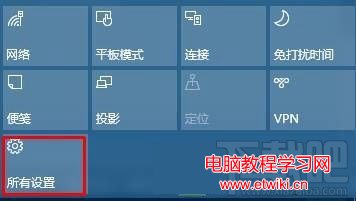
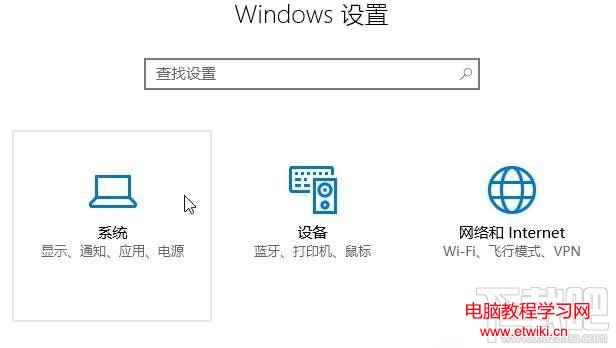
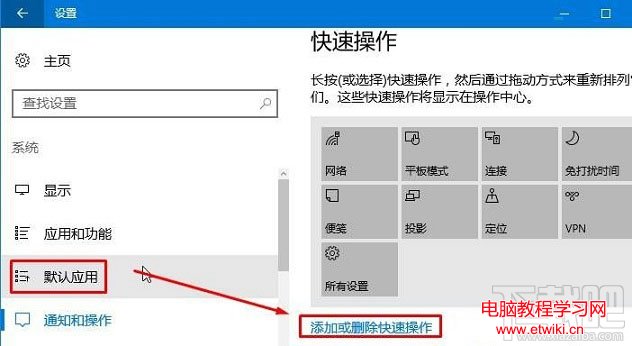
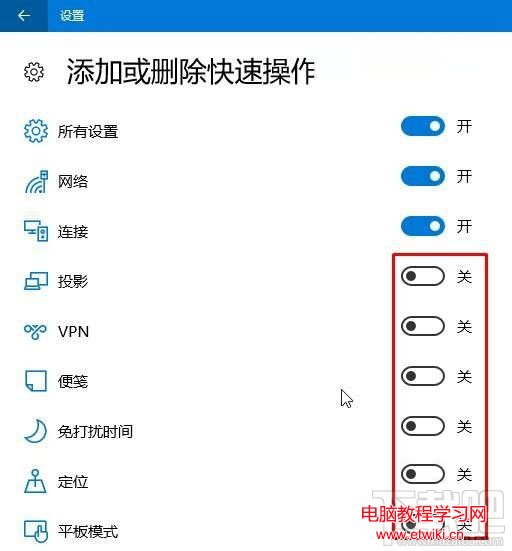
Windows 10 作業中心 (通知區域) 底部的快速動作按鈕 (如 Wi-Fi、藍牙、夜間模式等) 可依個人習慣增減。
Windows 10 Mobile 隱藏零售演示模式啟用與還原教學:僅供展示機使用,謹慎操作
Win7 總是彈出 Windows Installer 準備安裝該如何處理?
Windows 7 強制關機後無法開機?兩種修復啟動故障的實用方法
Windows 10 行動裝置如何錄製慢動作影片?WinHEC 曝光相機新功能支援可變幀率
Windows 8 內建語音辨識功能完整設定與使用教學
Win7 電腦卡頓不流暢?七大核心成因深度解析與對症療法
Win10 專業版運行變慢卡頓?10 招優化加速:碎片整理、啟動項、服務、驅動、SSD、記憶體全方位提速
Win10 線上獲取更多主題,微軟官方主題庫海量免費下載