Windows XP Windows 7 Windows 2003 Windows Vista Windows 綜合教學 Linux 系統教學
Windows 10 Windows 8 Windows 2008 Windows NT Windows Server 電腦軟體教學

Win8 應用程式安裝與解除安裝完整教學:Store 下載、右鍵解除、所有應用尋找

編輯:Win8 常見問題解答

Win8 Modern 應用安裝/移除方式與傳統桌面程式不同,統一透過 Windows Store 管理。

安裝應用

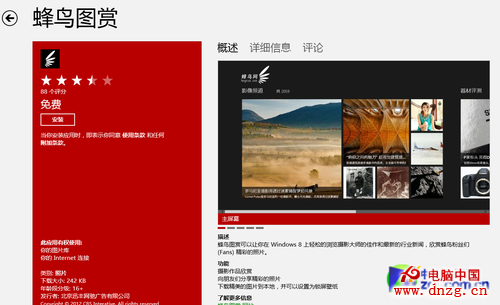
  1. 開啟 Windows Store,瀏覽分類或搜尋關鍵字。
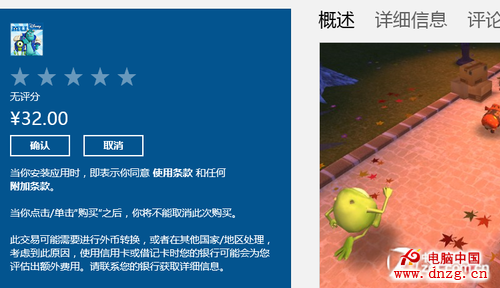
  2. 進入應用頁面點選 安裝(免費)或 購買(付費)。
  3. 下載安裝完成後自動出現在開始畫面,更新時 Store 磚會提示。

Store 安裝介面

付費應用購買按鈕

解除安裝應用

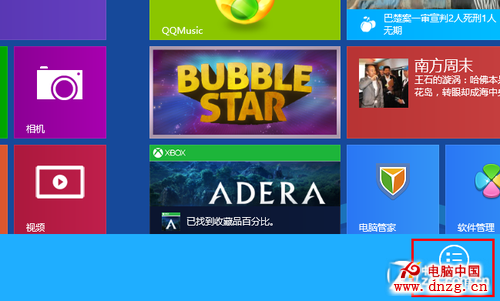
  1. 開始畫面右鍵點選應用磚 → 底部工具列選 解除安裝,確認後秒級完成。
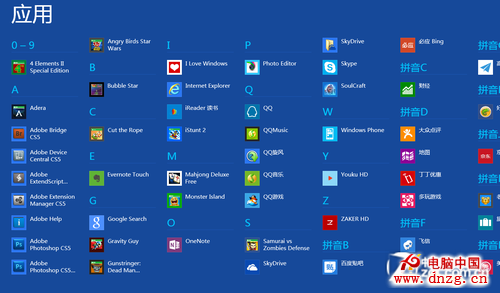
  2. 若應用未固定在開始畫面:開始畫面空白處右鍵 → 所有應用 → 找到目標應用 → 右鍵 → 解除安裝。
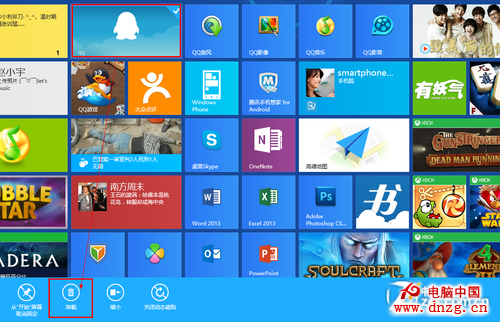
右鍵解除安裝

所有應用入口

所有應用中尋找

Modern 應用管理極度簡化,無需控制台、無殘留檔案,適合觸控操作。

Copyright © Windows教程網 All Rights Reserved