筆電與公司電腦同時出現開機進入歡迎/登入畫面前,黑屏等待 30 秒至 1 分鐘的問題,且與休眠無關。經排查,主因是 Windows Font Cache Service(Windows 字型快取服務) 未設為自動啟動。
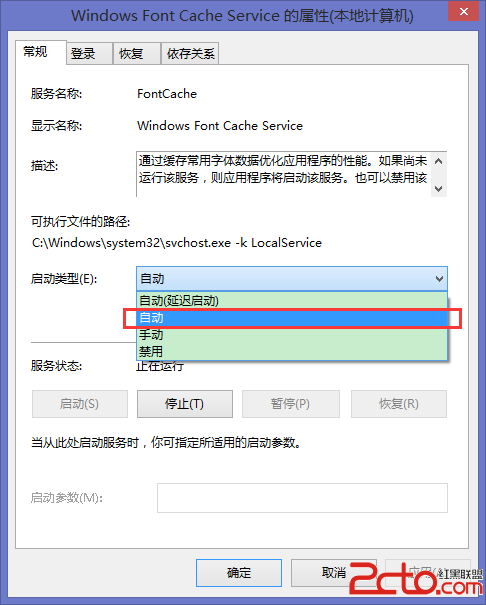
services.msc 開啟服務管理員。若設定密碼後登入卡住,建議先移除密碼重開機,再重新設定密碼,通常即可排除。
Windows 9 更多細節曝光:核心升級 6.3,介面沿用 Win8 並全面扁平化
鮑爾默預測 Windows 8 年底用戶破 5 億,Win7 今年達 3.5 億,平板市場 2015 年將達 3.2 億台
Win8 軟體精選:自由時代的新聞訂閱應用——鮮果聯播、網易雲閱讀、ZAKER HD
YouTube Connect 手機直播 App 使用教學:隨時隨地開啟直播、聊天互動與回放
Windows 8 IE10 關閉多重分頁時停用關閉警告訊息設定
Win8 內建郵件 App 完整設定指南:通知、動態磚、鎖屏提醒與多帳號新增