Windows XP Windows 7 Windows 2003 Windows Vista Windows 綜合教學 Linux 系統教學
Windows 10 Windows 8 Windows 2008 Windows NT Windows Server 電腦軟體教學

Win8 ReadyBoost 使用教學:USB 隨身碟當快取加速、可調整空間大小、隨時停用

編輯:Win8 系統應用技巧

ReadyBoost 利用 USB 隨身碟作為快取加速系統回應:

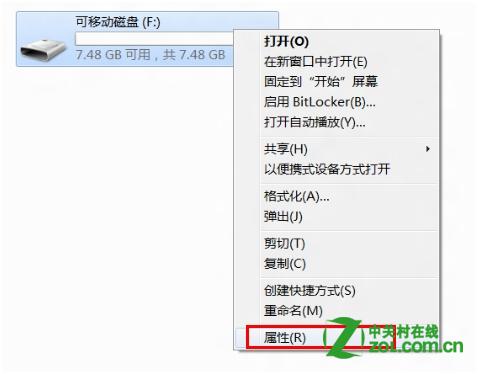
  1. 插入 USB 隨身碟 → 右鍵磁碟機代號 → 「內容」
  2. USB內容
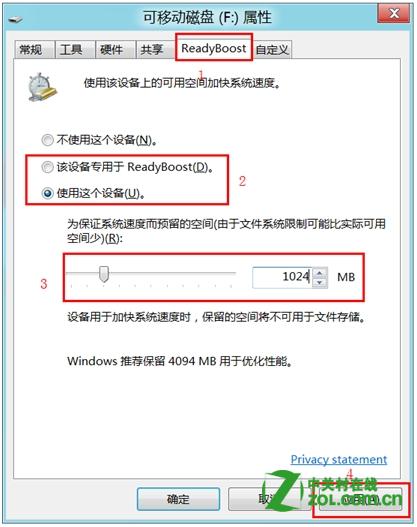
  3. 「ReadyBoost」索引標籤 → 選擇:
  4. 「將這個裝置專用於 ReadyBoost」(全盤用作快取)
  5. 或「使用這個裝置」 → 設定空間大小 → 「套用」
  6. ReadyBoost設定
  7. 套用後 USB 根目錄出現 ReadyBoost.sfcache 檔案,佔用設定空間

  8. ReadyBoost檔案
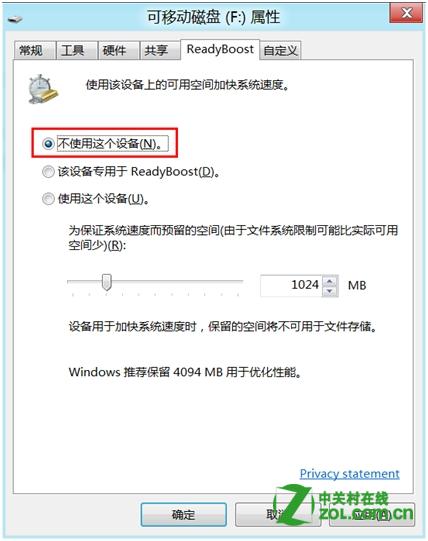
  9. 停用:ReadyBoost 索引標籤選「不使用這個裝置」 → 空間釋放
  10. 停用ReadyBoost

需 USB 2.0 以上、隨機讀取 2.5MB/s 以上、隨機寫入 1.75MB/s 以上的隨身碟才有效;SSD 系統碟效果不明顯。

Copyright © Windows教程網 All Rights Reserved