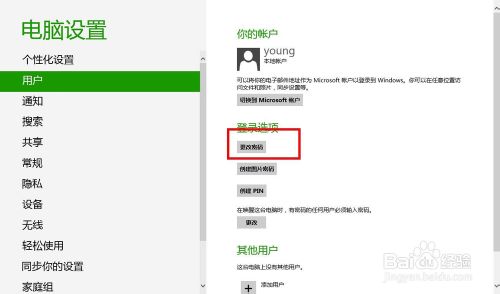
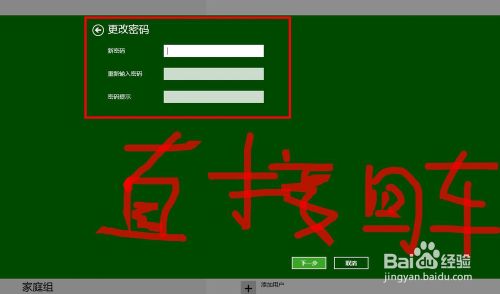
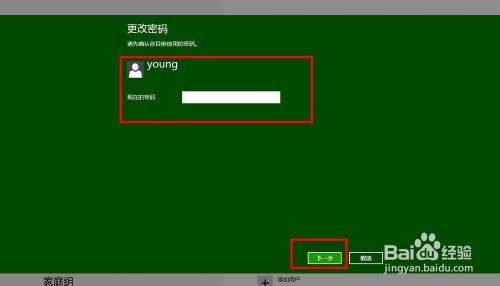
若在安全環境下使用,可移除管理員帳戶密碼實現開機免輸入密碼直接進入桌面。
重新開機後,登入畫面將不再要求輸入密碼,直接點擊使用者圖示即可進入系統。
警告:移除密碼會降低裝置安全性,攜帶型裝置或共用環境強烈建議保留密碼或改用 PIN/圖片密碼。
Win 8 設定 USB 隨身碟「快速移除」免安全移除硬體直接拔除
Windows 8 設定排程更新安裝後不自動重開機教學
Win8.1 OneDrive 離線存取教學:檔案總管與 App 兩種方式同步雲端檔案
Windows 8 使用 360 安全衛士恢復開始選單快速開啟控制台
Win8.1 撥號上網 (PPPoE) 設定:網路和共用中心建立寬帶連線
Windows 8.1 快速切換使用者帳戶:Shift+右鍵「以其他使用者身分執行」
Win8 主題 MadobeYu.deskthemepack 無效?語言衝突解決法:暫時切換日文地區
Win8 關機快捷鍵大全:從傳統選單到 Alt+F4、Win+I、桌面捷徑多種花式關機法